Python is an intuitive general-purpose language with an easy-to-understand syntax. It makes prototyping, web development, data science and more, much easier than in any other programming languages. This is due to its large and supportive community and its numerous software libraries.
You have ever found yourself writing mutliple times the same lines of code in different projects? Or perhaps, you have already written some useful library that you would like to make available to others? Or maybe, you are just interested in Python Packaging or in contributing to the Python community?
In this article we will create a small package and then upload it to Python Package Index (PyPi) so that anyone can download and use your code as a software library using pip install .
When I built my first package in Python, I found the process somewhat tedious. That motivated me to write this article which will put you through the basics of how to build a Python package and share it with the rest of the world.
Requirements
If you have a GitHub account and Python installed you can jump ahead to the Project Overview.
Git Repository
To be part of the open-source community, you must publicly host a project on a version control hosting service. The most common choice is to use a Git repository host which holds a virtual storage of your project. It allows you to coordinate work among programmers and save versions of your code, which you can access when needed. The most used hosting service is GitHub. If you don’t have an account yet, the first step is to create one right here.
Python
We will use Python 3. Any version from Python 3.5 can be used for the project. If you don’t have Python, you can download it from python.org’s download page. I will be using Python 3.7 on Windows, yet it doesn’t matter what version or OS you have for this project. If you are new to Python, I could suggest you to go through some exercises of this tutorial.
IDE
An Integrated Development Environment (IDE) is a source code editor that provides you with debugging and automation tools. It doesn’t matter what code editor or IDE you use as long as you like it. I will personnaly use a light yet powerful code editor called Visual Studio Code.
Let’s now build a simple package dealing with prime numbers. If you already have some code you would like to use instead, feel free to skip this part after structuring your code to resemble the project.
The first thing you have to do is find a suitable name for your library. Since our library deals with prime numbers, I went for primelib .
Below is how the project structure will look like. You can either create the files alongside me or directly download the whole repository on GitHub.
This may look like a lot of files but don’t worry, we are going to make and explain them one after the other.
Build The Project Step by Step
Initiate and Clone the GitHub Repository
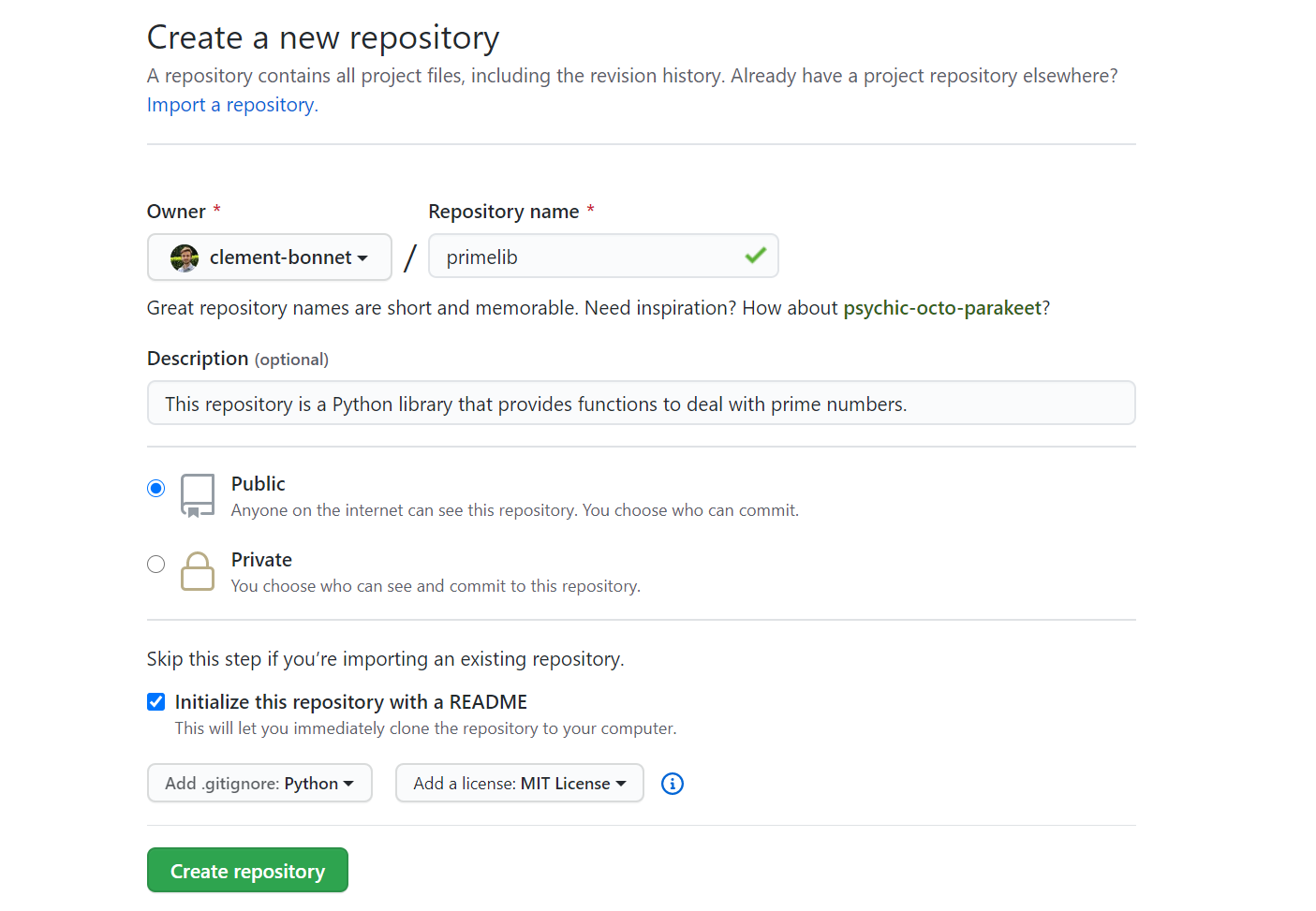
The first thing to do is to initiate a repository in GitHub. Sign in on GitHub and click the green “New”button. You should come upon a page whose title is “Create a new repository”. Fill in the blanks like below while opting for a README file, a Python .gitignore file, and an MIT License. When you are ready, click “Create repository”.
Once you have your repository created on GitHub, you must clone it locally on your computer. For this you should have Git installed as well as a terminal on your machine. In Windows I recommend to use the new Windows Terminal although you can definitely go for the Command Prompt. Open a terminal and make sure git is correctly installed by running git --version . Then go wherever you would like to store your project locally using cd . Finally you can run the git clone https://github.com/YOUR-USERNAME/primelib.git . The link is provided when clicking on the green “Code” button.
You should now have your project copied on your computer. Feel free to open the primelib folder in your favorite code editor. You should have the following structure.
.gitignore
LICENSE
README.md
The .gitignore file enables you to ignore some files while tracking and uploading your code to the repository.
The LICENSE file is just a .txt file containing the license for the project. You can find your needs here, although the MIT license is a good default choice for several projects.
The README.md file is a Markdown-formatted file containing a description of the project. You can write documentation for the modules and functions that your library will provide.
In the primelib/ folder, you can now add a new folder also called primelib that will contain all your code. In this new folder, create 2 Python files called prime_numbers.py and __init__.py (with two leading and two trailing underscores).
Let’s start with prime_numbers.py which contains the Python code we will be using. You can just copy and paste this code into your prime_numbers.py file.
The Python code contains two functions:
_divides is a private function therefore starting with a leading underscore. It is used by the next function is_prime and returns True if and only if div divides n .
is_prime checks whether a number n has a divisor different than 1 and itself, it returns True if so.
The __init__.py file is necessary to turn primelib into a package. It will be the file executed by your Python interpreter when running import primelib or from primelib import ... . To make your functionis_prime directly accessible from your library with the command: primelib.is_prime(n) , you must write the following in your __init__.py file:
Tests
Alright now is time to create some tests to make sure our functions work as expected. You can now create a tests folder within your project directory and add a test_prime.py file in it.
Then you can use the Pytest library which is part of Python Standard Library, so it comes with Python, no need to install it. Pytest will automatically check your assert statements in any test_*.py file. In your terminal, you can just run the following command.
python -m pytest
You should now see your two tests passed with success. This means you are ready to build the package and share your library with the community.
We are going to use three libraries setuptools , wheel and twine . Make sure they are available in your environment.
pip install --upgrade setuptools wheel twine
One last file is required to build the package. You must add a setup.py file at the root of your directory. This tells setuptools how to actually build the package. Let’s add this last file to obtain the final tree structure.
Here is the setup.py file. You can copy and paste it while replacing YOUR-USERNAME with your name to make the library name unique.
The three mandatory parameters are name, version and packages. You can now build the library with the following.
python setup.py sdist bdist_wheel
This generates distribution archives in the dist/ directory. You can now install the library in your local environment doing python setup.py install . You can try to import primelib in a Python shell.
Now that you have a working library, you can upload it on Python Package Index (PyPi) to share it with the Python community. For the purpose of this tutorial we are going to use TestPyPi, it works exactly like PyPi but it is made for testing packages in order to keep the real servers as clean as possible.
First you have to register an account on TestPypi and verify your email. You can finally upload your package as archives using the following line.
That’s done! Your package is now available for the community. If it was uploaded on PyPi you would directly be able to install the package with pip install primelib , but since it’s on TestPyPi for now, you can install your package using the following:
Your library is now available within your Python environment. I strongly recommend to use virtualenv to manage different environments.
Conclusion
Congrats! You have learnt how to create a Python package to wrap some code of yours and then how to share your library with the community so that anyone can use your work.
I hope you now feel ready to contribute to the Python community and share your great code with the rest of the world!
If you’re interested in going further, I would recommend these important, yet much more advanced topics:
This article is the fourth in the series on the time-series data. We started by discussing various exploratory analyses along with data preparation techniques followed by building a robust model evaluation framework. And finally, in our previous article, we discussed a wide range of classical forecasting techniques that must be explored before moving to machine learning algorithms.
Now, in the current article, we are going to apply all these learnings to a real-life dataset. We will work through a time series forecasting project from end-to-end, from importing the dataset, analyzing and transforming the time series to training the model, and making predictions on new data. The steps of this project that we will work through are as follows:
Problem Description
Data Preparation and Analysis
Set up an Evaluation Framework
Stationary Check: Augmented Dickey-Fuller test
ARIMA Models
Residual Analysis
Bias corrected Model
Model Validation
Problem Description
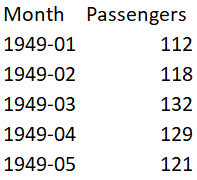
The problem is to predict the number of monthly airline passengers. We will use the Airline Passengers dataset for this exercise. This dataset describes the total number of airline passengers over time. The units are a count of the number of airline passengers in thousands. There are 144 monthly observations from 1949 to 1960. Below is a sample of the first few rows of the dataset.
We need the following libraries to work on this project. These names are self-explanatory but don’t worry if you are not getting any of them. As we go along you will understand the usage of these libraries.
import numpy
from pandas import read_csv
from sklearn.metrics import mean_squared_error
from math import sqrt
from math import log
from math import exp
from scipy.stats import boxcox
from pandas import DataFrame
from pandas import Grouper
from pandas import Series
from pandas import concat
from pandas.plotting import lag_plot
from matplotlib import pyplot
from statsmodels.tsa.stattools import adfuller
from statsmodels.tsa.arima_model import ARIMA
from statsmodels.tsa.arima_model import ARIMAResults
from statsmodels.tsa.seasonal import seasonal_decompose
from statsmodels.graphics.tsaplots import plot_acf
from statsmodels.graphics.tsaplots import plot_pacf
from statsmodels.graphics.gofplots import qqplot
Data Preparation and Analysis
We will use the read_csv() function to load the time series data as a series object, a one-dimensional array with a time label for each row. It is always good to take a peek at the data to confirm that data has been loaded correctly.
series = read_csv('airline-passengers.csv', header=0, index_col=0, parse_dates=True, squeeze=True)
print(series.head())
Let’s begin the data analysis by looking into the summary statistics, we will get a quick idea of the data distribution.
print(series.describe())
We can see the number of observations matches our expectations, the mean is about 280 which we can consider our level in this series. Other statistics like standard deviation and percentiles suggest a large spread of the data.
As a next step, we will visualize the values on a line plot, this tool can provide a lot of insights into the problem.
series.plot()
pyplot.show()
Here, the line plot suggests that there is an increasing trend of airline passengers over time. We can also observe a systematic seasonality to the travel pattern for each year and the seasonal signal appears to be growing over time, which suggests a multiplicative relationship.
This insight gives us a hint that data may not be stationary and we can explore differencing with one or two levels to make it stationary before modeling.
We can confirm our assumption by yearly line plots.
For the following plot, created year-wise separate groups of data and plotted a line plot for each year from 1949 to 1957. You can create this plot for any number of years.
groups = series['1949':'1957'].groupby(Grouper(freq='A'))
years = DataFrame()
pyplot.figure()
i = 1
n_groups = len(groups)
for name, group in groups:
  pyplot.subplot((n_groups*100) + 10 + i)
  i += 1
  pyplot.plot(group)
pyplot.show()
We can observe that seasonality is a yearly cycle by looking at line plots of the dataset by year. We can see a dip at each year-end and rise from July to August. This pattern exists across the years which again suggests us to adopt season based modeling.
Let’s explore the density of observations for further insight into our data structure.
We can observe that the distribution is not Gaussian, and this insight encourages us to explore some log or power transforms of the data before modeling.
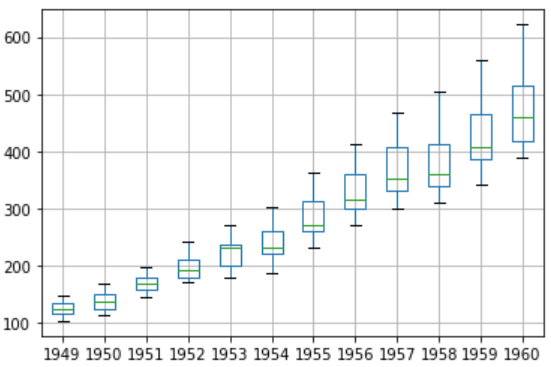
Let’s analyze monthly data by year and get an idea of the spread of observations for each year.
We will perform this analysis through a box and whisker plot.
groups = series['1949':'1960'].groupby(Grouper(freq='A'))
years = DataFrame()
for name, group in groups:
  years[name.year] = group.values
years.boxplot()
pyplot.show()
The spread of the data (blue boxes) suggests a growth trend over the years which also suggests our assumption of non-stationarity of the data.
Decompose the time series for more clarity on its components — Level, Trend, Seasonality, and Noise.
Based on our analysis till now, we have an intuition that out time series is multiplicative. So, we can decompose the series assuming a multiplicative model.
result = seasonal_decompose(series, model='multiplicative')
result.plot()
pyplot.show()
We can see that the trend and seasonality information extracted from the series validate our earlier findings that series has a growing trend and yearly seasonality. The residuals are also interesting, showing periods of high variability in the early and later years of the series.
Set up an Evaluation Framework to Build a Robust Model
Before proceeding to model building exercise we must develop an evaluation framework to assess the data and evaluate different models.
The first step is defining a validation dataset
This is historical data, so we cannot collect the updated data from the future to validate this model. Therefore, we will use the last 12 months of the same series as the validation dataset. We will split this time series into two subsets — training and validation, throughout this exercise we will use this training dataset named ‘dataset’ to build and test different models. The selected models will be validated through the ‘validation’ dataset.
We can see the training set has 132 observations and the validation set has 12 observations.
The second step is developing a baseline model.
The baseline prediction for time series forecasting is also known as the naive forecast. In this approach value at the previous timestamp is the forecast for the next timestamp.
We will use the walk-forward validation which is also considered as a k-fold cross-validation technique of the time series world. You can explore this technique in detail in one of my previous articles “Build Evaluation Framework for Forecast Models”.
series = read_csv('dataset.csv', header=None, index_col=0, parse_dates=True, squeeze=True)
X = series.values
X = X.astype('float32')
train_size = int(len(X) * 0.5)
train, test = X[0:train_size], X[train_size:]
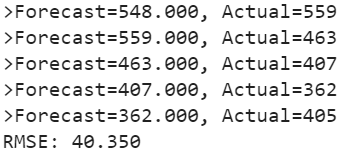
Here is the implementation of our Naive model and walk forward validation result for single-step forecasts.
history = [x for x in train]
predictions = list()
for i in range(len(test)):
  yhat = history[-1]
  predictions.append(yhat)
  obs = test[i]
  history.append(obs)
  print('>Forecast=%.3f, Actual=%3.f' % (yhat, obs))
# display performance report
rmse = sqrt(mean_squared_error(test, predictions))
print('RMSE: %.3f' % rmse)
As a performance measure, we have used RMSE (root mean squared error). Now, we have a baseline model accuracy result, RMSE: 40.350
Our goal is to build a model with higher accuracy than this baseline.
Stationary Check — Augmented Dickey-Fuller test
We already have some evidence from insights generated from exploratory data analysis that our time series is non-stationary.
We will confirm our hypothesis using this Augmented Dickey-Fuller test. This is a statistical test, It uses an autoregressive model and optimizes an information criterion across multiple different lag values.
The null hypothesis of the test is that the time series is not stationary.
As we have a strong intuition that time series is not stationary, so let’s create a new series with differenced values and check this transformed series for stationarity.
Let’s create a differenced series.
We will subtract the previous year’s same month value from the current value to make this new series.
def difference(dataset, interval=1):
  diff = list()
  for i in range(interval, len(dataset)):
    value = dataset[i] - dataset[i - interval]
    diff.append(value)
  return Series(diff)
X = series.values
X = X.astype('float32')# differenced datamonths_in_year = 12
stationary = difference(X, months_in_year)
stationary.index = series.index[months_in_year:]
Now, we can apply the ADF test on the differenced series as below.
We will use adfuller function to test our hypothesis as below.
result = adfuller(stationary)
print('ADF Statistic: %f' % result[0])
print('p-value: %f' % result[1])
print('Critical Values:')
for key, value in result[4].items():
  print('\t%s: %.3f' % (key, value))
The results show that the test statistic value -3.048011 is smaller than the critical value at 1% of -3.488. This suggests that we can reject the null hypothesis with a significance level of less than 1%.
Rejecting the null hypothesis means that the time series is stationary.
Let’s visualize the differenced dataset.
We can see a pattern in the plot looks random, does not show any trend or seasonality.
stationary.plot()
pyplot.show()
It’s ideal to use a differenced dataset as the input for our ARIMA model. As we know this dataset is stationary, therefore parameter ‘d’ can see set to 0.
Next, we have to decide lag values for Autoregression (AR) and Moving Average (MA) parameters.
These parameters are also known as p and q respectively. we can identify these parameters using Autocorrelation Function (ACF) and Partial Autocorrelation Function (PACF).
ACF shows a significant lag of 4 months, which means an ideal value for p is 4. PACF shows a significant lag of 1 month, which means an ideal value for q is 1.
Now, we have all the required parameters for the ARIMA model.
Autoregression parameter (p): 4
Integrated (d): 0 (We could have used 1, had we considered original observations as the input. We have seen our series transformed into stationary after one level of differencing)
Moving Average parameter (q): 1
Let’s create a function to invert differenced value
As we are modeling on a differenced dataset, we have to bring back the predicted values at the original scale by adding the same month value from the previous year.
history = [x for x in train]
predictions = list()
for i in range(len(test)):
  # difference data
  months_in_year = 12
  diff = difference(history, months_in_year)
  # predict
  model = ARIMA(diff, order=(3,0,1))
  model_fit = model.fit(trend='nc', disp=0)
  yhat = model_fit.forecast()[0]
  yhat = inverse_difference(history, yhat, months_in_year)
  predictions.append(yhat)
  # observation
  obs = test[i]
  history.append(obs)
  print('>Forecast=%.3f, Actual=%.3f' % (yhat, obs))
# report performance
rmse = sqrt(mean_squared_error(test, predictions))
print('RMSE: %.3f' % rmse)
We can see, an error has reduced significantly as compared to baseline.
We will further try to optimize the parameters using Grid Search
We will evaluate multiple ARIMA models with varying parameter (p,d,q) values.
# grid search ARIMA parameters for time series
# evaluate an ARIMA model for a given order (p,d,q) and return RMSE
def evaluate_arima_model(X, arima_order):
  # prepare training dataset
  X = X.astype('float32')
  train_size = int(len(X) * 0.66)
  train, test = X[0:train_size], X[train_size:]
  history = [x for x in train]
  # make predictions
  predictions = list()
  for t in range(len(test)):
    # difference data
    months_in_year = 12
    diff = difference(history, months_in_year)
    model = ARIMA(diff, order=arima_order)
    model_fit = model.fit(trend='nc', disp=0)
    yhat = model_fit.forecast()[0]
    yhat = inverse_difference(history, yhat, months_in_year)
    predictions.append(yhat)
    history.append(test[t])
  # calculate out of sample error
  rmse = sqrt(mean_squared_error(test, predictions))
  return rmse
# evaluate combinations of p, d and q values for an ARIMA model
def evaluate_models(dataset, p_values, d_values, q_values):
  dataset = dataset.astype('float32')
  best_score, best_cfg = float("inf"), None
  for p in p_values:
    for d in d_values:
      for q in q_values:
        order = (p,d,q)
        try:
          rmse = evaluate_arima_model(dataset, order)
          if rmse < best_score:
            best_score, best_param = rmse, order
          print('ARIMA%s RMSE=%.3f' % (order,rmse))
        except:
          continue
print('Best ARIMA%s RMSE=%.3f' % (best_param, best_score))
# load dataset
series = read_csv('dataset.csv', header=None, index_col=0, parse_dates=True, squeeze=True)
# evaluate parameters
p_values = range(0, 5)
d_values = range(0, 2)
q_values = range(0, 2)
warnings.filterwarnings("ignore")
evaluate_models(series.values, p_values, d_values, q_values)
Grid Search Output
We have found the best parameters through the grid search. We can further reduce the errors by using suggested parameters (1,1,1).
RMSE: 10.845
Residual Analysis
A final check is to analyze residual errors of the model. Ideally, the distribution of the residuals should follow a Gaussian distribution with a zero mean. We can calculate residuals by substracting predicted values from actuals as below.
residuals = [test[i]-predictions[i] for i in range(len(test))]
residuals = DataFrame(residuals)
print(residuals.describe())
And then simply use describe function to get summary statistics.
We can see, there is a very small bias in the model. Ideally, the mean should have been zero. We will use this mean value (0.810541) to correct the bias in our prediction by adding this value to each forecast.
Bias Corrected Model
As a last improvement to the model, we will produce a biased adjusted forecast. Here is the Python implementation.
history = [x for x in train]
predictions = list()
bias = 0.810541
for i in range(len(test)):
  # difference data
  months_in_year = 12
  diff = difference(history, months_in_year)
  # predict
  model = ARIMA(diff, order=(1,1,1))
  model_fit = model.fit(trend='nc', disp=0)
  yhat = model_fit.forecast()[0]
  yhat = bias + inverse_difference(history, yhat, months_in_year)
  predictions.append(yhat)
  # observation
  obs = test[i]
  history.append(obs)
# report performance
rmse = sqrt(mean_squared_error(test, predictions))
print('RMSE: %.3f' % rmse)
# errors
residuals = [test[i]-predictions[i] for i in range(len(test))]
residuals = DataFrame(residuals)
print(residuals.describe())
Bias corrected output
We can see errors have slightly reduced and mean has also shifted towards zero. The graphs also suggest a gaussian distribution.
In our example we had a very small bias, so this bias correction may not have proved to be a significant improvement, but in real-life scenarios, this is an important technique to be explored at the end in case any bias exists.
Check autocorrelation in the residuals
As a final check, we should investigate if there any autocorrelation exists in the residual. If exists, it means there is an opportunity for improvement in the model. Ideally, there should not be any autocorrelation left in the residuals if the model is fitted well.
The graphs suggest that all the autocorrelation has been captured in the model and there is no autocorrelation exists in the residuals.
So, our model has passed all the criteria. We can save this model for later use.
Model Validation
We have finalized the model, now it can be saved as a .pkl file for later use. Bias number can also be saved separately.
model.pkl: This includes the coefficients and all other internal data required for prediction.
model bias.npy: This is the bias value stored in a NumPy array.
bias = 0.810541
# save model
model_fit.save('model.pkl')
numpy.save('model_bias.npy', [bias])
Load the Model and Evaluate on Validation Dataset
This is the final step of this exercise. We will load our saved model along with a bias number and make predictions on the validation dataset.
# load and evaluate the finalized model on the validation dataset
validation = read_csv('validation.csv', header=None, index_col=0, parse_dates=True,squeeze=True)
y = validation.values.astype('float32')
# load model
model_fit = ARIMAResults.load('model.pkl')
bias = numpy.load('model_bias.npy')
# make first prediction
predictions = list()
yhat = float(model_fit.forecast()[0])
yhat = bias + inverse_difference(history, yhat, months_in_year) predictions.append(yhat)
history.append(y[0])
print('>Forecast=%.3f, Actual=%.3f' % (yhat, y[0]))
# rolling forecasts
for i in range(1, len(y)):
  # difference data
  months_in_year = 12
  diff = difference(history, months_in_year)
  # predict
  model = ARIMA(diff, order=(1,1,0))
  model_fit = model.fit(trend='nc', disp=0)
  yhat = model_fit.forecast()[0]
  yhat = bias + inverse_difference(history, yhat, months_in_year)
  predictions.append(yhat)
  # observation
  obs = y[i]
  history.append(obs)
  print('>Forecast=%.3f, Actual=%.3f' % (yhat, obs))
# report performance
rmse = sqrt(mean_squared_error(y, predictions))
print('RMSE: %.3f' % rmse)
pyplot.plot(y)
pyplot.plot(predictions, color='red')
pyplot.show()
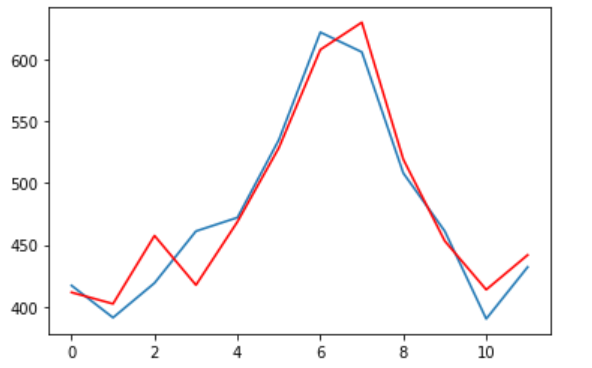
We can observe the actual and forecasted values for the validation dataset. These values are also plotted on a line plot which shows a promising result of our model.
Actual vs Forecast — Validation dataset
You can find the entire code at my Gist repository.
Summary
This tutorial can be used as a template for your univariate time series specific problems. Here, we learned every step involved in any forecasting project, starting from exploratory data analysis to model building, validation, and finally, saving the model for later use.
There are some additional steps that you should explore to improve the result. You can try box cox transformation on the original series and use that as input for the model, apply grid search on the transformed dataset to find optimal parameters.
Thanks for reading! Please feel free to share any comments or feedback.
Hope you found this article informative. In the next few articles, I will discuss some advanced forecasting techniques.