Monday, September 7, 2020

10 Things You Didn’t Know About Pandas

 Pandas is the definitive library for performing data analysis with Python. It was originally developed by a company called AQR Capital Management but was open-sourced for general use in 2009.

It rapidly became the go-to tool for data analysis for Python users and now has a huge array of features for data extraction, manipulation, visualisation and analysis.

Pandas has many useful methods and functions here are ten things you might not know about the library.


Pandas can be pip installed if you don’t already have it. The full documentation, with some excellent general data analysis tutorials, can be found here.

pip install pandas

Throughout the article, I will provide code examples using the ‘autos’ data set which consists of a variety of characteristics of a car and its corresponding insurance risk rating. This data set is typically used as a machine learning classification task where the objective is to predict the risk rating of the car.

Data analysis is an important preliminary step before building a machine learning model.

If you have Scikit-learn the data set can be imported using the code below. Alternatively, it can be downloaded here.


1. You can create Excel-like pivot tables

Pivot table are generally regarded as one of the most powerful features of Excel. They enable a user to quickly understand patterns and features contained within very large data sets by grouping, filtering and performing calculations across variables.

The Pandas library contains methods that allow you to create pivot tables very similar to those found in Excel and other spreadsheet tools.

The code below uses a Pandas pivot table to compare the insurance risk rating for cars based on the number of cylinders they have.

Image for post

2. The describe() function can also be used to analyse non-numeric features

The pandas describe() function quickly generates a summary of descriptive statistics for, by default, only numerical values in a data set. This extremely useful Pandas tool is, however, also capable of providing a summary of non-numeric columns by simply adding the include=’all’ argument.

This is very helpful for including information such as the dimensionality of categorical variables which helps to inform transformation strategies for machine learning.

data.describe(include='all')
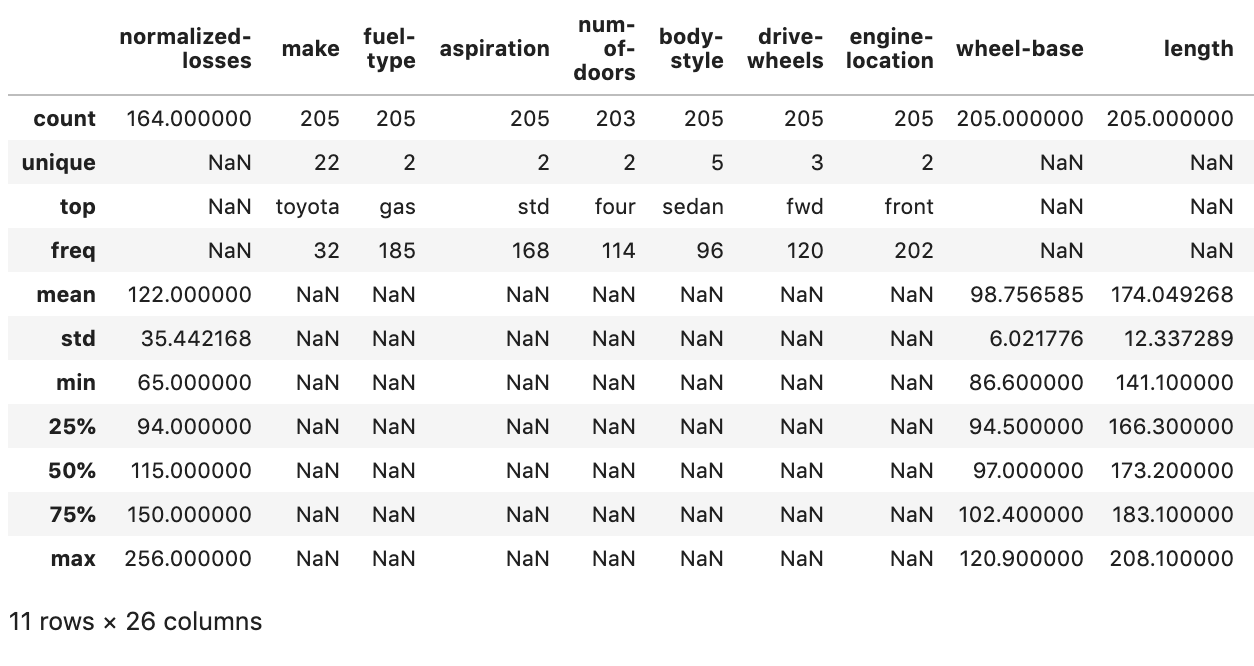
Image for post

3. Built-in statistical functions

Much like Excel Pandas includes a wide range of computational tools for applying common statistical methods to your data. For example, correlations between variables in a data set can quickly be computed using the corr() method.

round(data.corr(),2)
Image for post

4. Plotting functionality

Pandas has built-in plotting functionality which allows you to quickly create the most common types of plots from your data frames, groupbys or pivot tables.

The below code creates a scatter plot comparing engine size and horsepower in our data frame.

data.plot.scatter(x='engine-size', y='horsepower')
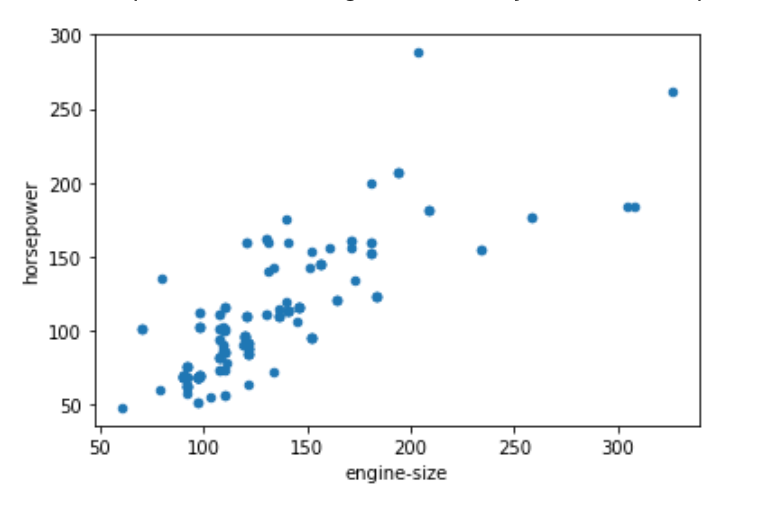
Image for post

Simply adding .plot() to the pivot table I created earlier produces a plot of the summarised data.

pivot_table.plot()
Image for post

5. Even prettier plots

By default, the Pandas plotting methods use Matplotlib as the backend for the visualisations. However, Pandas also supports a wide range of other Python plotting libraries.

To change the backend and use Bokeh for the visualisations, for example, simply use the following code.

This gives a richer, interactive visualisation.

Image for post

For a more detailed tutorial on using different backends for Pandas visualisations see my previous article below.


6. Tools for the split-apply-combine strategy

The split-apply-combine as a useful strategy for data analysis was first outlined in a paper by Hadley Wickham in 2011. This paper details a common data analysis pattern whereby data is first broken down into sensible, manageable chunks or segments, operations are performed on each individual segment and then pieced back together again to form comparisons.

This data analysis pattern is seen in pivot tables, as we have described above and in SQL group by statements. In addition to pivot tables, Pandas provides another method that utilises this strategy known as groupby().

This method, in a single line of code, allows you to break down your data set into segments, perform some statistical computation or calculation and then piece those segments back together again to compare them.

The following code segments the data by unique values in the target variable, computes the mean for each column and then displays the results.

Image for post

7. Prettier tables with style

If you want to share the results of your data analysis using Pandas then the chances are that you will want to make your data tables look a bit nicer and easier to digest by a human. Pandas has a range of Styling options to control how results are displayed in data frames.

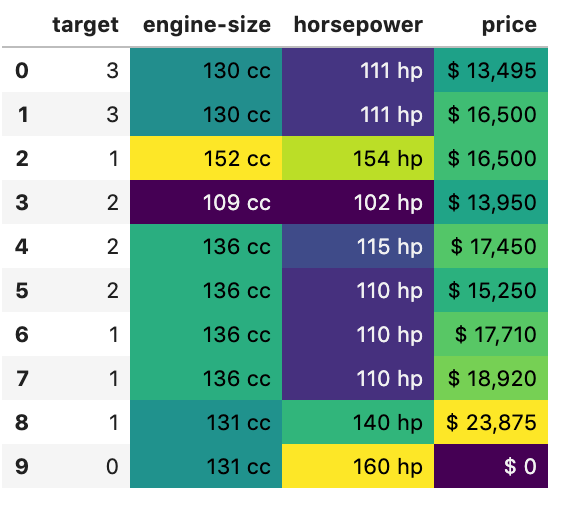
The style options can change how numbers are displayed, e.g. add a % sign to a percentage point, control the number of decimal places, add conditional formatting to results or highlight specific values.

The below code applies appropriate styling to a selection of columns in our data set. The output is now much easier to read.

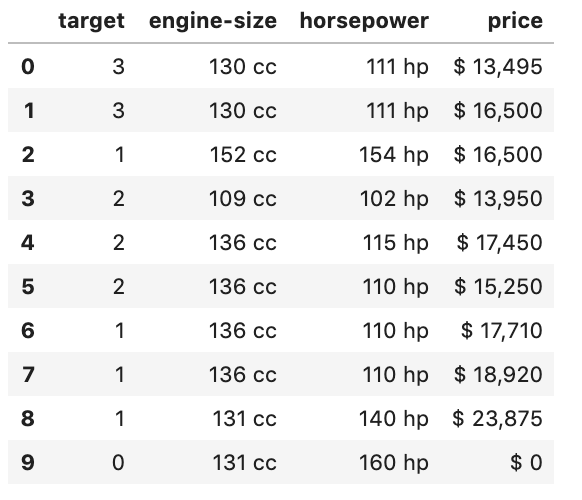
Image for post

8. Easily create a heatmap with built-in styles

Pandas has some common style patterns built-in. You can use one of these to easily create a heatmap.

The code below applies heatmap formatting to the data_summary we created earlier.

Image for post

9. Use Pandas options to control the display

Pandas has a range of options that you can set that control the output of your data frames. These can be used to control things like the maximum number of rows or columns to display, the number of decimal places to use when displaying floats and the format in which dates are displayed.


10. Add captions to tables

There are also a range of styles that can be added to tables that enhance the display outside of the data.

For example, you can add a caption to a table like this.

Image for post

Towards Data Science

A Medium publication sharing concepts, ideas, and codes.

Machine Learning With SQL — It’s Easier Than You Think

 If you’ve been studying data science, it’s likely you know how to perform machine learning tasks in languages like Python, R, and Julia. But what can you do when speed is the key, the hardware is limited, or the company you work for treats SQL as the only option for predictive analytics? In-database machine learning is the answer.

Image for post
Photo by hao wang on Unsplash

We’ll use Oracle Cloud for this article. It’s free, so please register and create an instance of the OLTP database (Version 19c, has 0.2TB of storage). Once done, download the cloud wallet and establish a connection through SQL Developer — or any other tool.

This will take you 10 minutes at least but is a fairly straightforward thing to do, so I won’t waste time on it.

We’ll use Oracle Machine Learning (OML) to train a classification model on the well-known Iris dataset. I’ve chosen it because it doesn’t require any preparation — we only need to create the table and insert the data.

Let’s do that next.


Data preparation

As mentioned, we need to create a table for holding the Iris dataset, and then we need to load data to it. OML requires one column to be used as row ID (sequence), so let’s keep that in mind:

CREATE SEQUENCE seq_iris;
CREATE TABLE iris_data(
iris_id NUMBER DEFAULT seq_iris.NEXTVAL,
sepal_length NUMBER,
sepal_width NUMBER,
petal_length NUMBER,
petal_width NUMBER,
species VARCHAR2(16)
);

Awesome! Now we can download the data and load it:

Image for post

When a modal window pops-up simply provide a path to the downloaded CSV and click Next a couple of times. SQL Developer should get things right without your assistance.

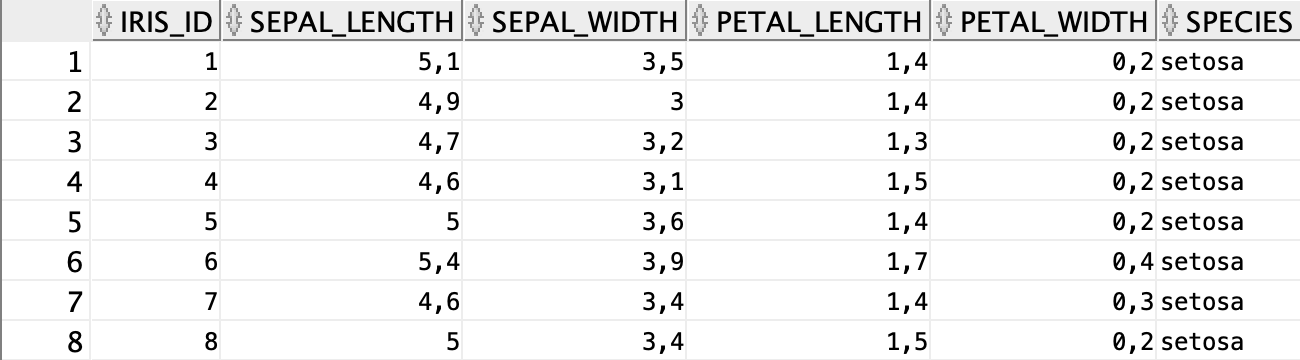
Once done, we have our dataset loaded and prepared:

Image for post

Let’s continue with the fun part now.


Model training

Now we can get our hands dirty with the fun stuff, and that’s training the classification model. This is broken down into multiple steps, such as train/test split, model training, and model evaluation. Let’s start with the simplest one.

Train/test split

Oracle likes this step done with two views — one for training data and one for testing data. We can easily create those with a bit of PL/SQL magic:

BEGIN
EXECUTE IMMEDIATE
‘CREATE OR REPLACE VIEW
iris_train_data AS
SELECT * FROM iris_data
SAMPLE (75) SEED (42)’;
EXECUTE IMMEDIATE
‘CREATE OR REPLACE VIEW
iris_test_data AS
SELECT * FROM iris_data
MINUS
SELECT * FROM iris_train_data’;
END;
/

This script does two things:

  1. Creates a train view — has 75% of data (SAMPLE (75)) split at the random seed 42 ( SEED (42))
  2. Creates a test view — as a difference of the entire dataset and the training view

Our data is stored in views named iris_train_data and iris_test_data — you guess which one holds what.

Let’s quickly check how many rows are in each:

SELECT COUNT(*) FROM iris_train_data;
>>> 111

SELECT COUNT(*) FROM iris_test_data;
>>> 39

We are ready to train the model, so let’s do that next.

Model training

The easiest method for model training is through DBMS_DATA_MINING package, with a single procedure execution, and without the need for creating additional settings tables.

We’ll use the Decision Tree algorithm to train our model. Here’s how:

DECLARE 
v_setlst DBMS_DATA_MINING.SETTING_LIST;
BEGIN
v_setlst(‘PREP_AUTO’) := ‘ON’;
v_setlst(‘ALGO_NAME’) := ‘ALGO_DECISION_TREE’;

DBMS_DATA_MINING.CREATE_MODEL2(
‘iris_clf_model’,
‘CLASSIFICATION’,
‘SELECT * FROM iris_train_data’,
v_setlst,
‘iris_id’,
‘species’
);
END;
/

The CREATE_MODEL2 procedure (curious why it wasn’t named CREATE_MODEL_FINAL_FINAL89) accepts a lot of parameters. Let’s explain the ones we entered:

  • iris_clf_model — simply the name of your model. Can be anything
  • CLASSIFICATION — type of machine learning task we’re doing. Must be uppercase for some reason
  • SELECT * FROM iris_train_data — specifies where the training data is stored
  • v_setlst — above declared settings list for our model
  • iris_id — name of the sequence type column (each value is unique)
  • species — name of the target variable (what we’re trying to predict)

Executing this block will take a second or two, but once done it’s ready for evaluation!

Model evaluation

Let’s use this script to evaluate our model:

BEGIN
DBMS_DATA_MINING.APPLY(
‘iris_clf_model’,
‘iris_test_data’,
‘iris_id’,
‘iris_apply_result’
);
END;
/

It applies iris_clf_model to the unseen test data iris_test_data and stores evaluation results into a iris_apply_result table. Here’s how this table looks like:

Image for post

It has many more rows (39 x 3), but you get the point. This still isn’t the most straightforward thing to look at, so let’s show the results in a slightly different way:

DECLARE 
CURSOR iris_ids IS
SELECT DISTINCT(iris_id) iris_id
FROM iris_apply_result
ORDER BY iris_id;
curr_y VARCHAR2(16);
curr_yhat VARCHAR2(16);
num_correct INTEGER := 0;
num_total INTEGER := 0;
BEGIN
FOR r_id IN iris_ids LOOP
BEGIN
EXECUTE IMMEDIATE
‘SELECT species FROM
iris_test_data
WHERE iris_id = ‘ || r_id.iris_id
INTO curr_y;
EXECUTE IMMEDIATE
‘SELECT prediction
FROM iris_apply_result
WHERE iris_id = ‘ || r_id.iris_id ||
‘AND probability = (
SELECT MAX(probability)
FROM iris_apply_result
WHERE iris_id = ‘ || r_id.iris_id ||
‘)’ INTO curr_yhat;
END;

num_total := num_total + 1;
IF curr_y = curr_yhat THEN
num_correct := num_correct + 1;
END IF;
END LOOP;

DBMS_OUTPUT.PUT_LINE(‘Num. test cases: ‘
|| num_total);
DBMS_OUTPUT.PUT_LINE(‘Num. correct : ‘
|| num_correct);
DBMS_OUTPUT.PUT_LINE(‘Accuracy : ‘
|| ROUND((num_correct / num_total), 2));
END;
/

Yes, it’s a lot, but the script above can’t be any simpler. Let’s break it down:

  • CURSOR — gets all distinct iris_ids (because we have them duplicated in iris_apply_results table
  • curr_y, curr_yhat, num_correct, num_total are variables for storing actual species and predicted species at every iteration, number of correct classifications, and total number of test items
  • For every unique iris_id we get the actual species (from iris_test_data, where ids match) and the predicted species (where prediction probability is the highest in iris_apply_results table)
  • Then it’s easy to check if the actual and predicted values are identical — which indicates the classification is correct
  • Variables num_total and num_correct are updated at every iteration
  • Finally, we print the model’s performance to the console

Here’s the output for this script:

Image for post

Awesome! To interpret:

  • The test set has 39 cases
  • Of these 39, 37 were classified correctly
  • Which results in the 95% accuracy

And that’s pretty much it for the model evaluation.


Before you go

And there you have it — machine learning project written from scratch in SQL. Not all of us have the privilege to work with something like Python on our job, and if a machine learning task comes on your desk you now know how to solve it via SQL.

This was just a simple classification task, of course, and scripts can be improved further, but you get the point. I hope you’ve managed to follow along. For any questions and comments, please refer to the comment section.

Thanks for reading.


Originally published at https://www.betterdatascience.com on September 6, 2020.

Algorithm Spotlight: Euclidean Algorithm

 The Euclidean algorithm is an algorithm for quickly finding the GCD (greatest common divisor) of two numbers and is an extremely important number theory concept. The GCD is used in many applications, like simplifying fractions, modular arithmetic, and also encryption algorithms such as the RSA Encryption Algorithm.


Review: Greatest Common Divisor (GCD)


Approach 1: Division

Finding the GCD of 105 and 72

Image for post
Image for post
Image for post
Image for post


Approach 2: Subtraction

Finding the GCD of 36 and 48

Deduplicating Data on the Databricks Lakehouse: Making joins, BI, and AI queries “safe by default.”

  Imagine this: your manager asks the AI analytics tool: "What were our top-selling products last quarter?" The AI generates perfe...