Sunday, August 2, 2020

Announcing PyCaret 2.0

We are excited to announce the second release of PyCaret today.

PyCaret is an open source, low-code machine learning library in Python that automates machine learning workflow. It is an end-to-end machine learning and model management tool that speeds up machine learning experiment cycle and makes you more productive.

In comparison with the other open source machine learning libraries, PyCaret is an alternate low-code library that can be used to replace hundreds of lines of code with few words only. This makes experiments exponentially fast and efficient.

See detailed release notes for PyCaret 2.0.

Why use PyCaret?

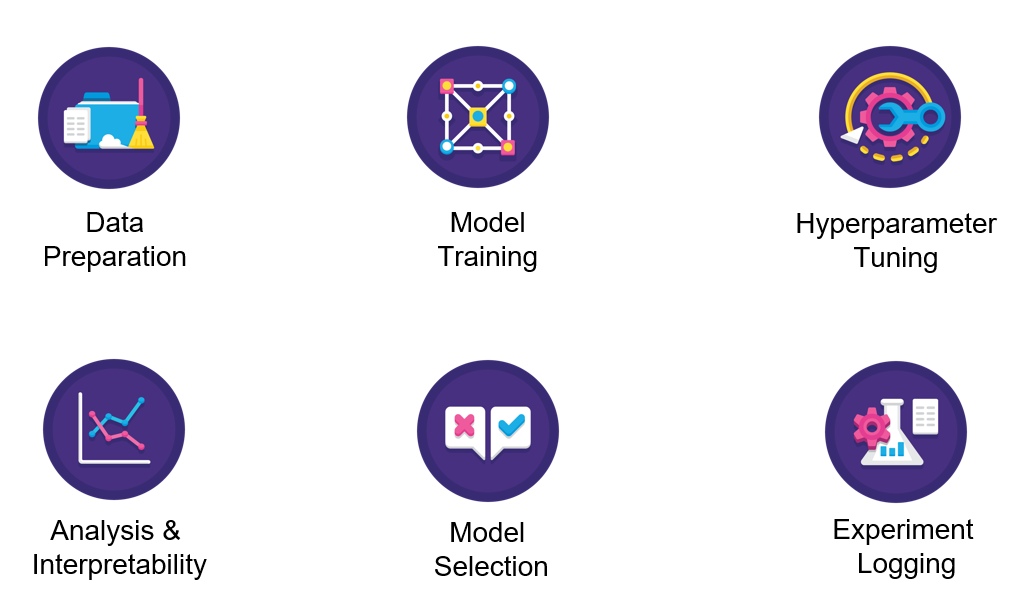
PyCaret 2.0 Features

Installing PyCaret 2.0

Installing PyCaret is very easy and takes only a few minutes. We strongly recommend using virtual environment to avoid potential conflict with other libraries. See the following example code to create a conda environment and install pycaret within that conda environment:

# create a conda environment 
conda create --name yourenvname python=3.6
# activate environment
conda activate yourenvname
# install pycaret
pip install pycaret==2.0
# create notebook kernel linked with the conda environment python -m ipykernel install --user --name yourenvname --display-name "display-name"

If you are using Azure notebooks or Google Colab, run the following code to install PyCaret.

!pip install pycaret==2.0

All hard dependencies are automatically installed when you install PyCaret using pip. Click here to see the complete list of dependencies.

👉 Getting Started with PyCaret 2.0

The first step of any machine learning experiment in PyCaret is to set up an environment by importing the relevant module and initialize the setup function by passing dataframe and name of the target variable. See example code:

Sample Output:

Image for post
Output is truncated

All the preprocessing transformations are applied within setup function. PyCaret provides over 20 different pre-processing transformation that can be defined within setup function. Click here to learn more about PyCaret’s preprocessing abilities.

https://www.pycaret.org/preprocessing

👉 Compare Models

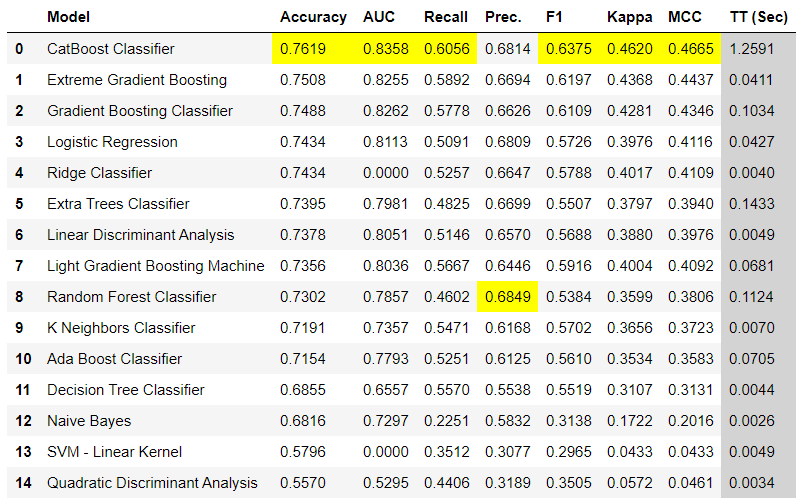
This is the first step we recommend in any supervised machine learning task. This function trains all the models in the model library using default hyperparameters and evaluates performance metrics using cross validation. It returns the trained model object class. The evaluation metrics used are:

  • For Classification: Accuracy, AUC, Recall, Precision, F1, Kappa, MCC
  • For Regression: MAE, MSE, RMSE, R2, RMSLE, MAPE

Here are few ways you can use compare_models function:

Sample Output:

Sample output from compare_models function

👉 Create Model

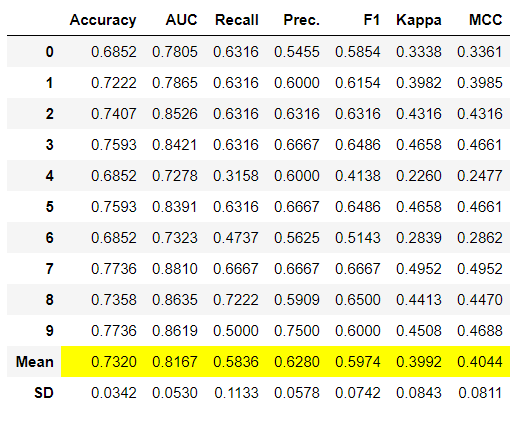
Create Model function trains a model using default hyperparameters and evaluates performance metrics using cross validation. This function is base to almost all other functions in PyCaret. It returns the trained model object class. Here are few ways you can use this function:

Sample Output:

Image for post
Sample output from create_model function

To learn more about create model function, click here.

👉 Tune Model

Tune Model function tunes the hyperparameter of the model passed as an estimator. It uses Random grid search with pre-defined tuning grids that are fully customizable. Here are few ways you can use this function:

To learn more about tune model function, click here.

👉 Ensemble Model

There are few functions available to ensemble base learners. ensemble_model, blend_models and stack_models are three of them. Here are few ways you can use this function:

To learn more about ensemble models in PyCaret, click here.

👉 Predict Model

As the name suggests, this function is used for inference / prediction. Here is how you can use it:

👉 Plot Model

Plot Model function is used to evaluate performance of the trained machine learning model. Here is an example:

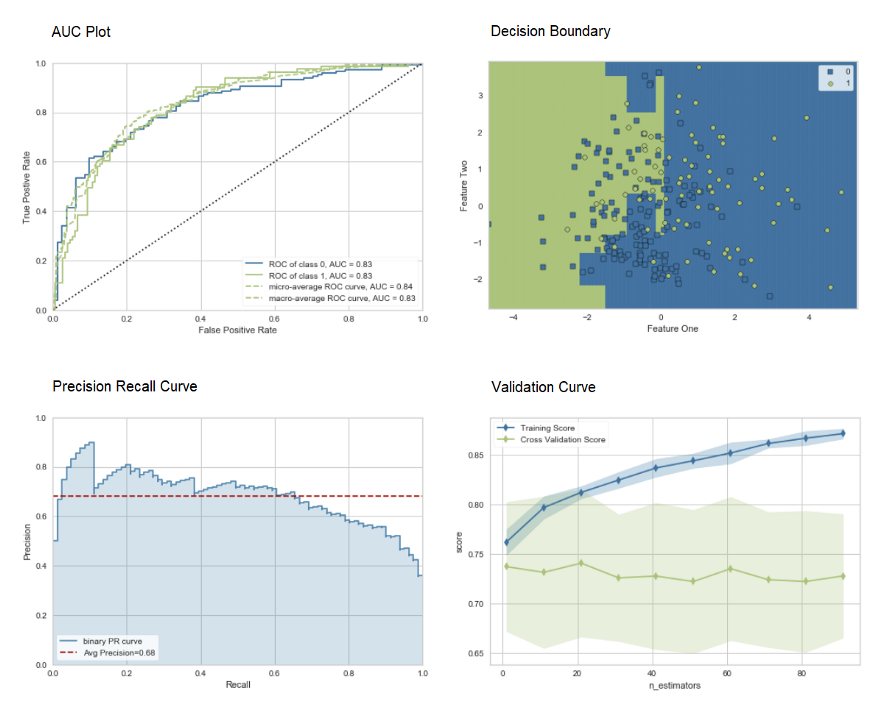
Sample output from plot_model function

Click here to learn more about different visualization in PyCaret.

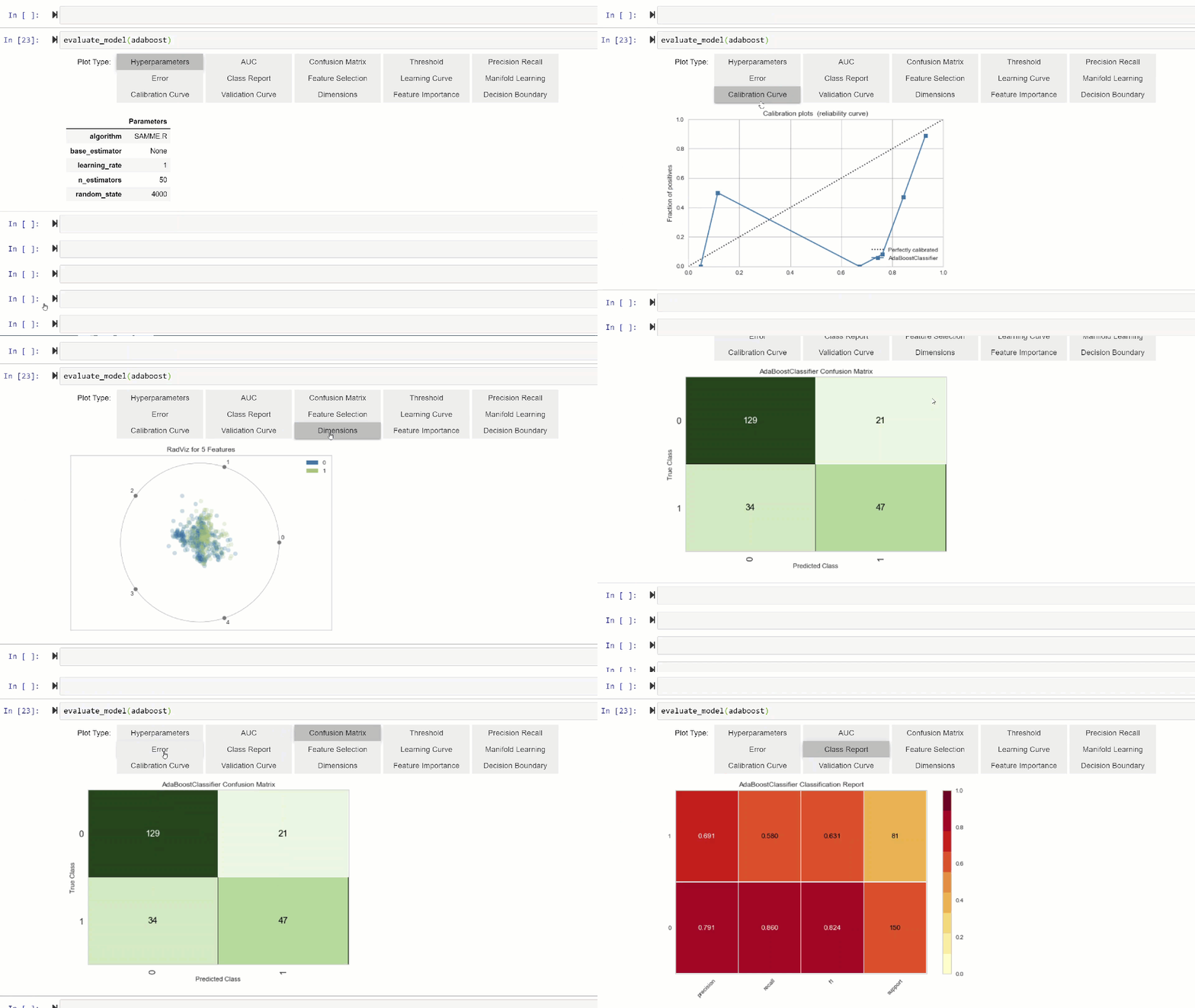
Alternatively, you can use evaluate_model function to see plots via the user interface within notebook.
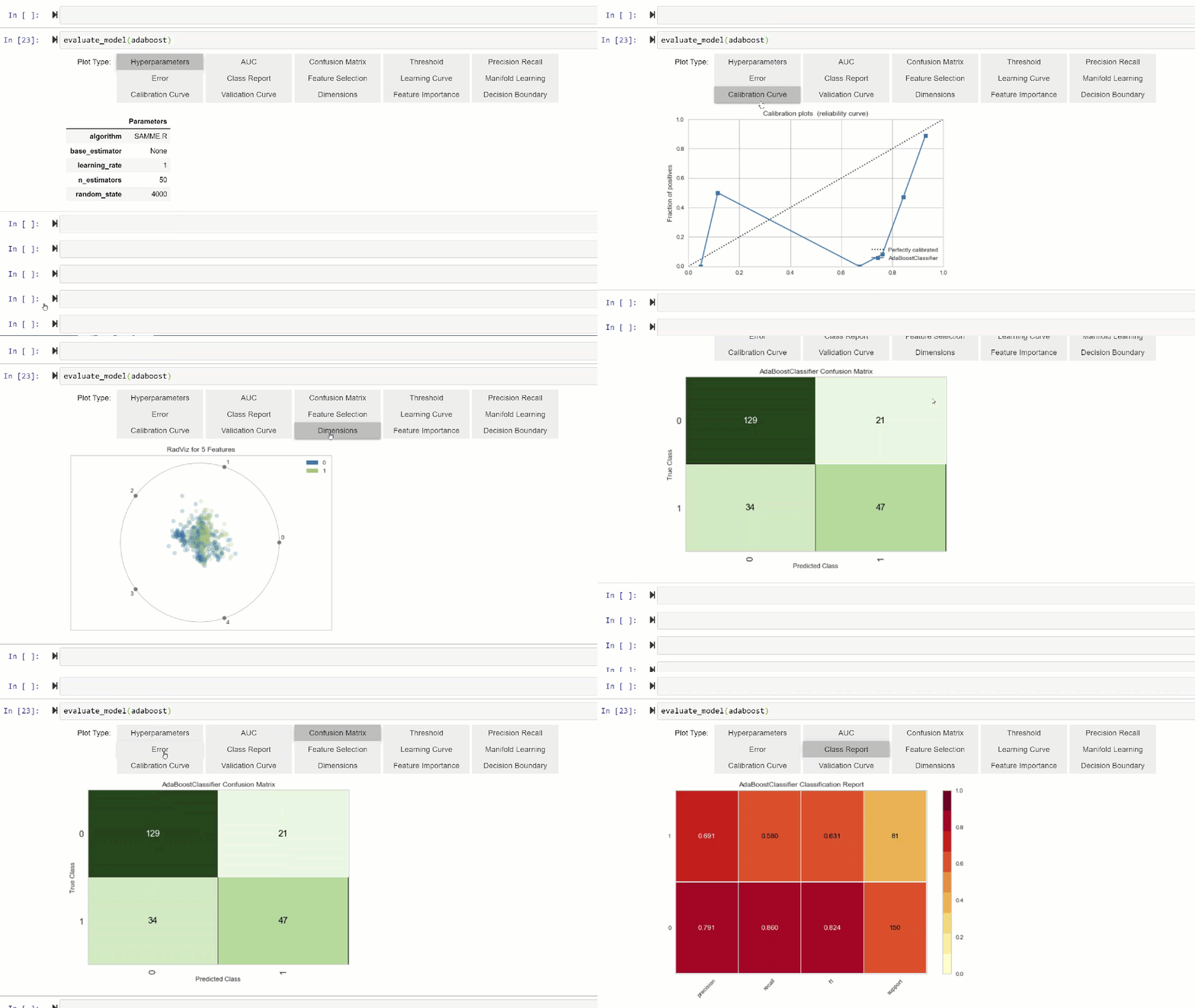
evaluate_model function in PyCaret

👉 Util functions

PyCaret 2.0 includes several new util functions that comes handy when managing your machine learning experiments with PyCaret. Some of them are shown below:

To see all new functions implemented in PyCaret 2.0, See release notes.

👉 Experiment Logging

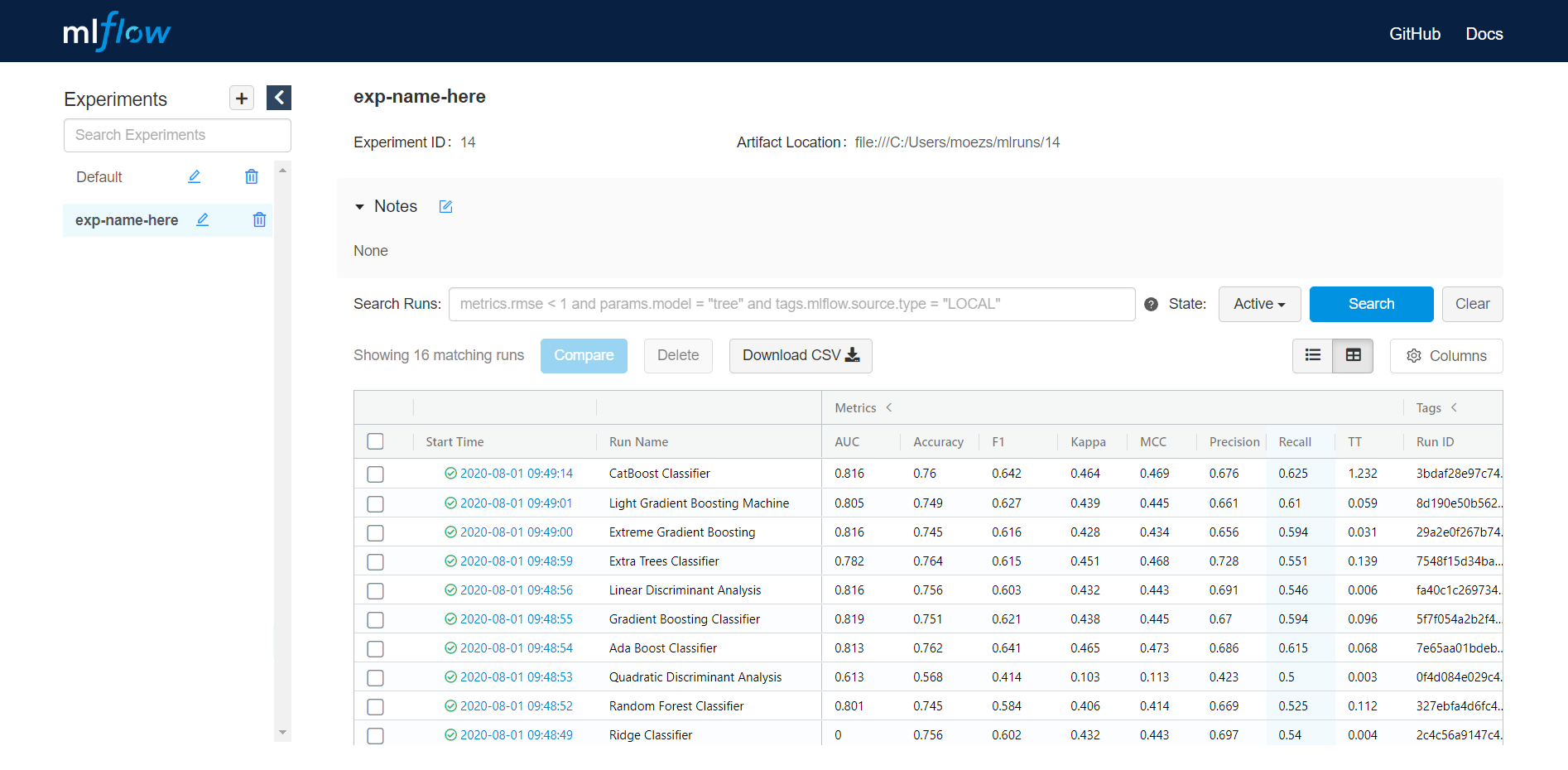
PyCaret 2.0 embeds MLflow tracking component as a backend API and UI for logging parameters, code versions, metrics, and output files when running your machine learning code and for later visualizing the results. Here is how you can log your experiment in PyCaret.

Output (on localhost:5000)

https://localhost:5000

👉 Putting it all together — Create your own AutoML software

Using all the functions, let’s create a simple command line software that will train multiple models with default parameters, tune hyperparameters of top candidate models, try different ensembling techniques and returns / saves the best model. Here is the command line script:

This script will dynamically select and saves the best model. In just few lines of code you have developed your own Auto ML software with a full fledged logging system and even a UI presenting beautiful leaderboard.

There is no limit to what you can achieve using the light weight workflow automation library in Python. If you find this useful, please do not forget to give us ⭐️ on our github repo if you like PyCaret.

To hear more about PyCaret follow us on LinkedIn and Youtube.

Important Links

Release Notes for PyCaret 2.0
User Guide / Documentation
Github
Install PyCaret
Notebook Tutorials
Contribute in PyCaret

Want to learn about a specific module?

Click on the links below to see the documentation and working examples.

Classification
Regression
Clustering
Anomaly Detection
Natural Language Processing
Association Rule Mining

Towards Data Science

A Medium publication sharing concepts, ideas, and codes.

Moez Ali

WRITTEN BY

Moez Ali

Data Scientist, Founder & Author of PyCaret

Towards Data Science

A Medium publication sharing concepts, ideas, and codes.

Saturday, August 1, 2020

How to Use Pass, Break, and Continue in Python 3 ways to exit a clause in Python

Learning how to code in Python isn’t easy. Maybe you’ve leveraged compound statements in Python that contain groups of other statements, or clauses that affect the flow of control. Have you ever encountered scenarios where you were unable to implement what you want in loops or if-else?

You might need to know more about how to exit a clause using pass, break, and continue. Before learning these three methods, get familiar with some built-in Python features in this article:

Clause

A clause in Python — such as if, for, and while loop — consists of a header and its suite separated by a colon :. The number of times its suite is executed depends on the satisfaction of the header condition.

# The following is a clause
if a > 0: # This is a header
print(a) # This is a suite

1. Pass

Let’s start with something relatively easy (but not straightforward). Nothing happens when pass is executed. Its main purpose is to act as a placeholder where the interpreter expects a statement.

Remember a colon-separated compound statements needs a header and a suite? If you want a suite to do nothing, you cannot end the statement with the colon :. This is where pass comes in handy, as a statement is syntactically required.

def foo():
pass

But why would we want a compound statement to do nothing in the first place?

Image for post
Photo by Federico Bottos on Unsplash

If there’s a function or a loop that we would like to implement in the future, we might construct an empty function or loop first with an empty body. Since this is syntactically illegal, we use the null statement pass as a placeholder to comply with the syntax requirement.

This is useful for creating an empty clause in project development.


2. Break

The break statement allows you to leave a for or while loop prematurely.

In the following example, the break statement is executed when a == 2 is satisfied. It terminates the loop early. The for-loop control target (i.e. a in this case) keeps its current value when break is executed.

You can also exit a while loop early using break in a similar fashion. No loops can resist break, not even a while True loop that could execute its suite indefinitely.

Image for post
Photo by Kalen Emsley on Unsplash

3. Continue

The continue statement ignores the rest of the statements inside a loop, and continues with the next iteration. Note that continue does not halt the loop like break does, but rather skips and carries on to the next iteration.


No Curly Braces in Python for Blocks

A new way to define the block by Indentation and Colon


The meaning of both curly braces ( {} ) and colon ( : ) to define a block of a group of statements called a suite. Curly braces use by most of the languages like C, C++, Java and etc. Python is famous for its simple user-friendly syntax. Python is the programming language that uses white space as an indentation in their codes for functions, for loops, if-else and etc. Different people use a different length of spaces before a statement so, its a little bit mixed way for writing the codes without maintaining the same length of spaces for all block statements. Let’s see what is this indentation and colon in python programming language.

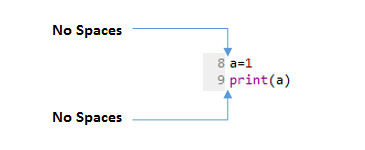
Image for post
No spaces in normal statements

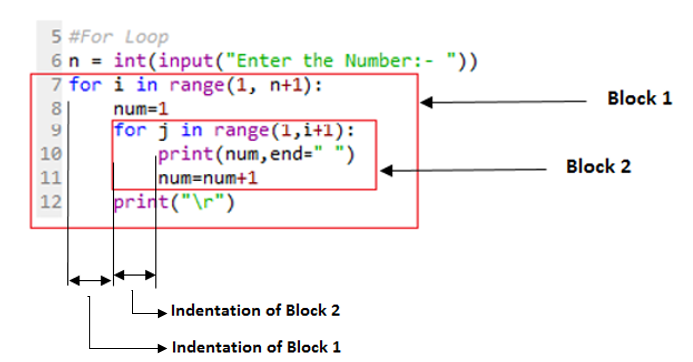
The above photos show no indentation spaces for normal statements. On the other side, the statements come in block or suite need to be indented to keep them as a suite that belongs to one particular functions or loops. For beginners, it is very much confusing to them because they used to for curly braces in their blocks. Sometimes, people think why python needs to tell me how to write my code, but we should not argue on the syntax. It’s a very technical way of coding. The white spaces given for indentation can be 1 or other numbers, but the white spaces given to one line should be the same throughout the block.

Image for post
Indentation comes in Block statements

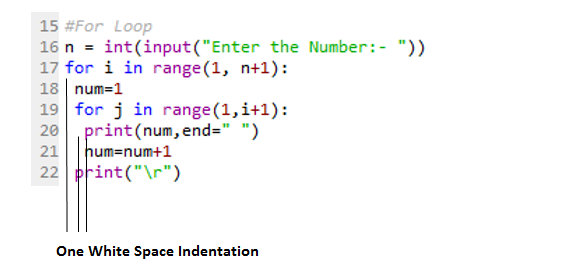
What if we give one white space indentation. Will it give the error?. The answer is NO. If we maintain the same indentation for all the statements belongs to one suite it will execute with no error.

Image for post
With one indentation in block
#For Loop 
n = int(input("Enter the Number:- "))
for i in range(1, n+1):
num=1
for j in range(1,i+1):
print(num,end=" ")
num=num+1
print("\r")
#output:
Enter the Number:- 3
1
1 2
1 2 3

As compare to other languages the ending of the block in python should be carefully defined with proper indentation, as in other languages the curly braces show the concrete block-ending character and have a low chance of getting any error. If it is confusing to press the space-bar many times then press the tab button once and it has done. One tab equals to 4 spaces.

Cross-platform compatibility note: because of the nature of text editors on non-UNIX platforms, it is unwise to use a mixture of spaces and tabs for the indentation in a single source file.

We can also see the types of errors in the improper way of indenting and de-denting.

 def user(n):                       # error: first line indented
for i in range(len(n)): # error: not indented
a= n[:i] + n[i+1:]
b= perm(n[:i] + n[i+1:]) # error: unexpected indent
for x in p:
r.append(l[i:i+1] + x)
return r # error: inconsistent dedent

What if we write multiple lines for the same variable. It seems that it needs indentation then it is no to this rather we can use line continuation character (\). For example:

values = 32 + 43 + 74 + \
81 + 31 + 56 + \
19 + 66 + 47

But this is not a way to write good code. In python, we can do line continuation inside parentheses (), brackets[] or braces {}. To do so we can use these as shown below example:

values = (32 + 43 + 74 + \
81 + 31 + 56 + \
19 + 66 + 47)

We can also write multiple statements in a single line with the help of semicolon. For example:

a = 2; name = "Happy" ; code = 23735

The indentation in while loop

val = 1
while(val<= 5):
print(val)
val= val+ 1
#output:
1
2
3
4
5

Comments

There is no need for indentation for comments in python. They are used to describe whats in the code. Comments are very helpful to retain whats the logic of the code if we come back to code after one month. The comments start with a hash symbol (#), and Python will render the rest of the line as a comment. There are two types of comments.

  1. Single line comment

Python single line comment starts with a hashtag symbol with no white spaces and lasts till the end of the line. If the comment exceeds one line then put a hashtag on the next line and continue the comment. Python’s single-line comments are proved useful for supplying short explanations for variables, function declarations, and expressions. See the following code snippet demonstrating single line comment:

#This is a comment.
print("Hello, World!")
# This is a comment
# Print “Hello World” to console
print("Hello, World!")

2. Multiple line comments

Python multi-line comment is a piece of text enclosed in a delimiter (""") on each end of the comment. Again there should be no white space between delimiter ("""). They are useful when the comment text does not fit into one line; therefore needs to span across lines. Multi-line comments or paragraphs serve as documentation for others reading your code. See the following code snippet demonstrating multi-line comment:

"""
Every coder is curious to know the current
date and time with some code.
Python is a great language to do
data analysis and manipulation.
"""

Docstrings

In python, it comes in PEP 257 with Docstring conventions. This PEP aims to standardize the high-level structure of docstrings, what they should contain, and how to say it in code. A docstring is a string literal that occurs as the first statement in a module, function, class, or method definition. Such a docstring becomes the __doc__ special attribute of that object. All modules should normally have docstrings, and all functions and classes exported by a module should also have docstrings.

Type of Docstrings

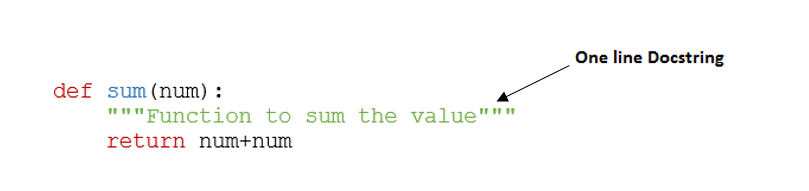
  1. One-line Docstrings

Triple quotes are used even though the string fits on one line. This makes it easy to later expand it. The closing quotes are on the same line as the opening quotes. This looks better for one-liners.

Image for post
One line Docstring

2. Multi-line Docstrings

Multi-line docstrings consist of a summary line just like a one-line docstring, followed by a blank line, followed by a more elaborate description. The docstring for a function or method should summarize its behavior and document its arguments, return value(s), side effects, exceptions raised, and restrictions.

Image for post

Python indentation makes our code beautiful. It also serves the purpose of grouping the statements into a code block. This results in the habit of writing beautiful code all the time because it’s not a Good-To-Have feature but a Must-Have requirement of the code.

If you are reading this means you read all processes above. Be with me for more fun and knowledge. Reach me through mail: design4led@gmail.com

Read more stories

  1. Latest Add On in Python — July 2020
  2. Image Processing — Color Spaces by Python
  3. Robotic Vision in Fruits Harvesting

Towards Data Science

A Medium publication sharing concepts, ideas, and codes.

Deduplicating Data on the Databricks Lakehouse: Making joins, BI, and AI queries “safe by default.”

  Imagine this: your manager asks the AI analytics tool: "What were our top-selling products last quarter?" The AI generates perfe...