Wednesday, August 17, 2022

Automate Time Series Feature Engineering in a few lines of Python Code

 Time Series data capture the variable's value repeatedly over time resulting in a series of data points indexed in time order. In time series data has natural temporal ordering i.e. the value of a variable at a particular time is dependent on past values.

Traditional machine learning algorithms are not designed to capture the temporal ordering of time series data. A data scientist needs to perform feature engineering to capture important characteristics of the data into a few metrics. Generating a lot of time series features and extracting the relevant ones from those is time taking and tedious task.

Here tsfresh package comes into the picture, which can generate standard hundreds of generic features for your time series data. In this article, we will discuss the in-depth usage and implementation of the tsfresh package.

tsfresh:

tsfresh is an open-source package that can generate hundreds of relevant time series features, fit to train a machine learning model. The features generated from tsfresh can be used to solve Classification, Forecasting, and Outlier Detection use-case.

Getting Started:

tsfresh package offers various capabilities to perform feature engineering on time series data including:

  • Feature Generation
  • Feature Selection
  • Compatibility with large data

Installation & Usage:

tsfresh is an open-sourced Python package that can be installed using:

pip install -U tsfresh
# or
conda install -c conda-forge tsfresh

1) Feature Generation:

tsfresh package offers an automated features generation API that can generate 750+ relevant features from 1 time series variable. The generated features include a wide range of spectrum including:

  • Descriptive Statistics (mean, max, correlation, etc)
  • Physics-based indicators for nonlinearity and complexity
  • Digital signal processing-related features
  • History compressed features

Usage:

A data scientist doesn’t need to waste time on feature engineering. tsfresh.extract_features() function generated 789 features from multiple domains for 1 time-series variable.

(Code by Author)

One can go through the tsfresh documentation to get an overview of extracted features.

2) Feature Selection:

tsfresh package also offers hypothesis test-based feature selection implementation that identifies relevant features for the target variable. To limit the number of irrelevant features tsfresh deploys the fresh algorithm (fresh stands for FeatuRe Extraction based on Scalable Hypothesis tests).

tsfresh.select_features() function the user can implement the feature selection.

3) Compatibility with Large Data:

For the conditions when we have a bunch of very large multiple time series data. tsfresh also offers APIs to scale the feature generation/extraction, and feature selection implementation for a large amount of data:

  • Multiprocessing: tsfresh package by default can parallelize the execution of feature generation/extraction and feature selection implementation to multiple cores.
  • tsfresh’s own distributed framework to scale the implementation for the data that fits into a single machine and distribute the feature calculation over multiple machines to speed up the calculation.
  • Apache spark or Dask for the data that does not fit into a single machine.

Here’s a wonderful articles by Nils Braun explaining implementation of tsfresh using Dask (Article part 1Article part 2).

Conclusion:

tsfresh is a handy package to generate and select relevant features for a time-series feature in a few lines of Python code. It automatically extracts and selects 750+ field-tested features from multiple domains on your time-based data sample. It reduces a lot of work time of a data scientist that was been wasted on feature engineering.

Usually, time-series data is quite large, and the tsfresh package also comes to the rescue for the same. tsfresh APIs can be applied to large data samples using multiprocessing, dask, or spark.

References:

[1] tsfresh documentation: https://tsfresh.readthedocs.io/en/latest/

[2] Nils Braun GitHub Article: https://nils-braun.github.io/tsfresh-on-cluster-1/

Sunday, August 14, 2022

About Hive Hbase Pig

All supported data source : 
Apache Hbase, Cassandra,mysql, delta Lake ,apache kafka ,elatic, mysql ,postgresql,mongodb, Hadoop HDFS, redis

################################################### Apache Hive
#Apache Hive:
Hive is a data warehouse system which is used to analyze structured data. It is built on the top of Hadoop. It was developed by Facebook.
Hive provides the functionality of reading, writing, and managing large datasets residing in distributed storage. It runs SQL like queries called HQL (Hive query language) which gets internally converted to MapReduce jobs.
Using Hive, we can skip the requirement of the traditional approach of writing complex MapReduce programs. Hive supports Data Definition Language (DDL), Data Manipulation Language (DML), and User Defined Functions (UDF).

#Features of Hive:
These are the following features of Hive:
 Hive is fast and scalable.
It provides SQL-like queries (i.e., HQL) that are implicitly transformed to MapReduce or Spark jobs.
It is capable of analyzing large datasets stored in HDFS.
It allows different storage types such as plain text, RCFile, and HBase.
It uses indexing to accelerate queries.
It can operate on compressed data stored in the Hadoop ecosystem.
It supports user-defined functions (UDFs) where user can provide its functionality.

#Limitations of Hive:
Hive is not capable of handling real-time data.
It is not designed for online transaction processing.
Hive queries contain high latency

#Differences between Hive and Pig:
Hive:
Hive
Hive is commonly used by Data Analysts
It follows SQL-like queries.
It can handle structured data
It works on server-side of HDFS cluster.
Hive is slower than Pig.

Pig:
Pig is commonly used by programmers
It follows the data-flow language
It can handle semi-structured data.
It works on client-side of HDFS cluster.
Pig is comparatively faster than Hive.

#Hive Architecture
The following architecture explains the flow of submission of query into Hive

## Hive client:  
 Hive allows writing applications in various languages, including Java, Python, and C++. It supports different types of clients such as:-
1)Thrift Server - It is a cross-language service provider platform that serves the request from all those programming languages that supports Thrift.
2)JDBC Driver - It is used to establish a connection between hive and Java applications. The JDBC Driver is present in the class org.apache.hadoop.hive.jdbc.HiveDriver.
3)ODBC Driver - It allows the applications that support the ODBC protocol to connect to Hive.

##Hive Services:
The following are the services provided by Hive:-

Hive CLI - The Hive CLI (Command Line Interface) is a shell where we can execute Hive queries and commands.
Hive Web User Interface - The Hive Web UI is just an alternative of Hive CLI. It provides a web-based GUI for executing Hive queries and commands.
Hive MetaStore - It is a central repository that stores all the structure information of various tables and partitions in the warehouse. It also includes metadata of column and its type information, the serializers and deserializers which is used to read and write data and the corresponding HDFS files where the data is stored.
Hive Server - It is referred to as Apache Thrift Server. It accepts the request from different clients and provides it to Hive Driver.
Hive Driver - It receives queries from different sources like web UI, CLI, Thrift, and JDBC/ODBC driver. It transfers the queries to the compiler.
Hive Compiler - The purpose of the compiler is to parse the query and perform semantic analysis on the different query blocks and expressions. It converts HiveQL statements into MapReduce jobs.
Hive Execution Engine - Optimizer generates the logical plan in the form of DAG of map-reduce tasks and HDFS tasks. In the end, the execution engine executes the incoming tasks in the order of their dependencies.

############################################# Apache Hbase #####
#Hbase:
Hbase is an open source framework provided by Apache. It is a sorted map data built on Hadoop. It is column oriented and horizontally scalable.
It is based on Google's Big Table.It has set of tables which keep data in key value format. Hbase is well suited for sparse data sets which are very common in big data use cases. Hbase provides APIs enabling development in practically any programming language. It is a part of the Hadoop ecosystem that provides random real-time read/write access to data in the Hadoop File System

#Why HBase:
RDBMS get exponentially slow as the data becomes large
Expects data to be highly structured, i.e. ability to fit in a well-defined schema
Any change in schema might require a downtime
For sparse datasets, too much of overhead of maintaining NULL values

#Features of Hbase:
Horizontally scalable: You can add any number of columns anytime.
Automatic Failover: Automatic failover is a resource that allows a system administrator to automatically switch data handling to a standby system in the event of system compromise
Integrations with Map/Reduce framework: Al the commands and java codes internally implement Map/ Reduce to do the task and it is built over Hadoop Distributed File System.
sparse, distributed, persistent, multidimensional sorted map, which is indexed by rowkey, column key,and timestamp.
Often referred as a key value store or column family-oriented database, or storing versioned maps of maps.
fundamentally, it's a platform for storing and retrieving data with random access.
It doesn't care about datatypes(storing an integer in one row and a string in another for the same column).
It doesn't enforce relationships within your data.
It is designed to run on a cluster of computers, built using commodity hardware

#

How to Create File System Triggers in Python


How to painlessly monitor file creation, modification, and deletion programmatically

Monitoring file system changes using Python.
Photo by Pixabay

Imagine you work with a client system where they upload files to an FTP folder. We’ve got to process the file as soon as it appears in the folder and push it to a database.

A real-time dashboard is accessing the database. Therefore, we must update the database without any delays.

You could run a periodic task and check for folder content. But let’s assume the quicker you update the database, the better for the user. The cost of the little delay when using a periodic task is high. Shorter periods might need more resources as your tasks run more often.

We need to build a filesystem trigger to accomplish the task.

Monitor new file creations in a folder.

We can use a Python script that actively listens to file system events in a folder.

We can start by installing a Python package called Watchdog. It’s available through the PyPI repository.

pip install watchdog# If you're using Poetry instead of Virtualenv
poetry add watchdog.

Here’s an example to start with. The following Python script will watch for file changes in the current directory. It’ll log all the changes when they happen.

Example file change monitoring in Python using Watchdog.

The important part of the above code is the FileProcessor class. But before getting in there, we should create an observer object to attach an event handler.

We can attach an event handler to the observer using the schedule method. In the example above, we’ve attached it to watch events in the current and all its downstream directories.

If you run this code and create a new file in the current directory, we could see the Python script printing the event on the terminal.

Python script listening to the changes in the current folder
Python script listening to the changes in the current folder-screencast by the author.

We’ve used the current folder in the schedule method of the observer object. You could also use any path of your choice. You could also choose to get it from the command line argument.

Here’s a modification to the same code that converts our script into a CLI. Now you can pass the path to monitor using a command line argument.

You can now run your script like the following in your terminal

python <YourScript>.py /somewhare/in/your/computer

In my previous post, you can learn more about creating a command line interface using Python.

Process file changes in the handler class

In our example, we’ve created an event handler by subclassing the ‘FileSystemEventHandler’ class. All event handlers should be like this.

The parent class has placeholders for several methods for file system events. We’ve used the ‘on_create’ method to handle all new file creations. Likewise, you can also use on_deleted, on_modified, on_moved, and on_any_event methods to handle other types of events.

Let’s update the on_create to process the file and insert values into a database. Feel free to skip this section if it’s irrelevant to your use case.

This code might look very familiar if you’ve worked with Sqlalchemy and Pandas. What’s worth noting is how we get the path of the newly created file.

Each event trigger in the ‘FileSystemEventHandler’ class references the path in its event argument. We can access it with the src-path tag as shown in the code.

If you run the code and let the Python script listen to the changes, it’ll also immediately push those changes to the database.

Serve your app in the background.

By now, you’d have noticed that our app runs on a live terminal. But it’s not wise to do this in production. Anything to the terminal session can impact the app.

The best way to run such services in the background is through a system service. Windows users can use the tool NSSM (Non-sucking Service Manager.) It’d be pretty straightforward if you skim through their documentation.

But in this post, I’ll be covering the Linux way of using systemctl.

You can create a new system service by creating a file with the following content in ‘/etc/systemd/system’ folder. You can name it anything with an extension of ‘.service’

[Unit]
Description="Process Data"
[Service]
Restart=always
WorkingDirectory=<PATH_TO_PROJECT_DIRECTORY>
ExecStart=<PATH_TO_PYTHON_EXECUTABLE> <YOUR_SCRIPT>.py
[Install]
WantedBy=multi-user target

Once you’re done, you can run the following commands on the terminal to activate the service.

# To make your new service available to systemctl utility.
$ systemctl daemon-reload
# To start the service
$ systemctl start <YOUR_SERVICE_FILE_NAME>.service

This will start the process. Now, as new files are being created on our FTP destination, this service will process and upload them to the database. And our real-time database will get fresh data without any delays.

You can check if your service is running properly with the following command.

systemctl status <YOUR_SERVICE_FILE_NAME>.service
Systemctl running a Python script — screenshot by the author.

Final thoughts

Processing file system change is rare these days as the world moves towards more robust integration between systems. But it doesn’t mean filesystem triggers have no usage.

There are many instances where we need to monitor new file creation or modifications. Take, for example, log stream processing. You could use the technique described here to process a new log line and push it to a data warehouse.

I’ve been using it for a long time now. And I don’t see the need for it to be reduced yet.

Saturday, August 13, 2022

The Essentials of Public Speaking for a Career in Data Science


Some tips on how to boost your public speaking skills as a data scientist

Photo by Kane Reinholdtsen on Unsplash

Data science is a relatively new field, and public speaking is an essential skill for anyone looking to build a career in this field. The ability to communicate complex data concepts clearly and effectively is essential for success in data science.

If you’re data-driven and looking to boost your career in science, public speaking is a great way to get noticed. But how exactly do you do that? We’ve got the essentials of public speaking for data science so you can make a splash at your next conference.

The content of this article has been inspired by the podcast episode at DataTalks.Club entitled The Essentials of Public Speaking for Career in Data Science with , a Chief AI Strategist at DataRobot.

The article is organized as follows:

  • Setting up your mindset
  • Getting started
  • Organizing a talk
  • Top public speaking skills to acquire

Setting up your mindset

There are many different ways to get involved with data science, but one of the most important is .

As a data scientist, you have the opportunity to be a powerful voice in the promotion of artificial intelligence and its potential to change the world. This means that you have a responsibility to educate others about what AI is and how it can be used for good. You can do this by writing blog posts, giving talks, or even just having conversations with people who are interested in learning more.

No matter what platform you use, your goal should be to provide accurate information about AI and its potential implications. It’s also important to be respectful of different perspectives and open to debate. After all, data science is still a young field and there is a lot that we don’t yet understand about its potential.

By engaging in promoting AI, you can help shape the future of this exciting field and ensure that it is used for the benefit of all.

Getting started

The most important thing you can do to become a great public speaker is to practice, practice, practice. The more you get up in front of an audience, the more comfortable you will become with speaking. Additionally, it is important to be well-prepared before each speaking engagement. Know your material inside and out, so that you can focus on delivering your message rather than worrying about what you are going to say next. Finally, remember that confidence is key. Radiate confidence and your audience will believe in you and your message.

More in detail, to become a great speaker, you should follow these steps:

  • . What is it about data science that you’re passionate about? What are you an expert in? Once you know your focus, start pitching your ideas to conferences. Keep your pitch short and sweet-you don’t want to overwhelm the organizers with too much information.
  • . The more comfortable you are with your material, the better you’ll be able to engage with your audience. If possible, record yourself giving a talk and watch it back-this will help you identify any areas that need improvement.
  • . The more genuine and enthusiastic you are, the more likely you are to make a lasting impression on your listeners. So go out there and show the world what data science is all about!
Image by Author

In addition, you should take care a lot about the audience , because it’s a point of reference. You need to consult with the audience after the talk, to find out. You’re not going to make everyone happy. You’re always going to have some people that didn’t like the talk or they’ve got some criticism.

Organizing a talk

One of the most successful ways to organize a talk is by transforming it into a story. You can do that, by focusing on the following aspects:

  • Getting attention
  • Being remembered
  • Audience feedback

The following figure summarizes how to organize a talk:

Image by Author

Getting Attention

When it comes to giving a presentation or speech, the introduction is often the most important part. This is your chance to make a good first impression and set the tone for the rest of your talk.

One of the most important things that make the difference is the . There are different ways to gain the audience's attention, including but not limited to:

  • storytelling
  • humor
  • a personal story
  • an anecdote
  • something surprising

According to Ben Taylor, you should . A better approach, which is very difficult, is to jump into a story where the audience concludes that you are the  of that story. This permits you to conquer the audience's emotions.

There are a few key things to keep in mind when crafting your introduction:

  1. . The last thing you want to do is bore your audience with a long-winded intro. Get to the point and give them a taste of what’s to come.
  2. . It’s perfectly normal to be nervous before a big speech, but don’t let it show. Speak slowly and deliberately, and project confidence in your voice and body language.
  3. . Start with a bang! Tell a joke, share an interesting fact, or ask a rhetorical question to engage your audience from the get-go.
  4. . Give some brief background information on the topic of your talk so that everyone is on the same page.
  5. . whet your audience’s appetite by giving them a sneak peek of what’s in store for the rest of your presentation.

Being remembered

When you’re giving a presentation, you want to be remembered for your great ideas and insights, not for your nervous fidgeting or “um”s. Here are a few tips to help you make a lasting impression.

  1. : It sounds simple, but making eye contact with your audience is one of the best ways to establish a connection with them.
  2. : Your body language should convey confidence and ease. Avoid crossing your arms or legs, and try to keep your hands relaxed.
  3. : Be sure to enunciate your words and speak at a moderate pace. This will help ensure that your audience understands you and doesn’t get lost in trying to decipher what you’re saying.
  4. : A genuine smile will make you seem approachable and likable — two qualities that will help make your presentation more successful.
  5. : One of the best ways to boost your confidence is to be thoroughly prepared for your presentation. Know your material inside and out so that you can focus on delivering it effectively rather than worrying about what comes next.

Audience feedback

If someone from the audience asks you a question, it means that your presentation was successful. However, it may happen that you don’t know the answer to a certain question. In this case, Ben Taylor suggests not trying to answer, but instead, you can say, “does anyone else in the audience know the answer?” or “let’s talk about this after. I’d love to hear your perspective.” And then go on to the next question where you actually can answer it.

Writing a talk proposal for conferences

Before speaking at big conferences, you should start at local meetings, where you probably know the organizers. Sometimes, when you submit a talk proposal for a conference, you must also include a short video of a previous talk. If you don’t have a previous video, you can think to record one, and publish it on YouTube or similar websites.

According to Ben Taylor, your talk proposal should be creative as possible.

In addition, it should include:

  • A brief description of your talk
  • The main theme or topics that will be covered
  • Why do you think this would be a good fit for the conference?
  • Any supporting materials you have (e.g. slides, demos, etc.)

Writing a strong proposal is essential to getting your talk accepted. Take some time to review the conference’s call for proposals and make sure your proposal aligns with their themes and goals. If you have any questions, don’t hesitate to reach out to the conference organizers.

There are often many different topics to choose from, so it’s important to pick one that will be both informative and engaging. Here are some good topics to begin your talks on:

  • The current state of data science and where it’s headed
  • The importance of data science in today’s world
  • How data science can be used to solve real-world problems
  • Interesting case studies or examples of data science in action
  • Your own personal experiences with data science

Top public speaking skills to acquire

There are a lot of important skills to acquire when seeking a career in data science, but public speaking is definitely one of the most important. Being able to effectively communicate your findings and insights is crucial in this field, and it takes practice to hone this skill. Here are a few tips to help you get started:

  • . It’s important to tailor your message to those who will be listening. Consider their level of understanding and what you want them to take away from your presentation.
  • . This may seem obvious, but it’s worth repeating. Make sure you know your material inside and out so that you can deliver a confident and polished presentation.
  • . Data can be complex, but your presentation doesn’t need to be. Use clear and concise language that everyone can understand.
  • . Keep your audience engaged by using stories, examples, and humor (when appropriate). no one wants to listen to a boring lecture, so make sure you keep things interesting!
  •  The more you practice, the better you’ll become at public speaking.
Image by Author

Summary

Congratulations! You have just learned the essentials of public speaking for a career in Data Science!

Public speaking is an essential skill for anyone in the field of data science. Data scientists are often called upon to present their findings to clients, managers, and other stakeholders. Being able to deliver a clear and concise presentation can make all the difference in whether or not your audience understands and buys into your work. If you’re looking to advance your career in data science, start by honing your public speaking skills.

The content of this article has been inspired by the podcast episode The Essentials of Public Speaking for Career in Data Science with Ben Taylor at DataTalks.Club.

The first version of this article was originally posted on DataTalks.Club.

You may also be interested in…

How to start a career in Data Science

While a data scientist’s job may vary depending on the industry, their responsibilities usually fall into one of three categories: Type A, Type B and Type C. In this article, we’ll explore the three main areas that data scientists should focus on.

The difference between Data Science Manager and Data Science Expert

In this article, we’ll explore the pros and cons of each option to help you make a decision for your organization.

How to build a Data Science team

Building a data team can be a challenge, but it’s definitely doable with careful planning and execution. In this article, we’ll explore some tips on how to build an effective data science team.

Interesting books…

  • Kindra Hall — Stories That Stick: How Storytelling Can Captivate Customers, Influence Audiences, and Transform Your Business
  • Al Ramadan, Dave Peterson, Christopher Lochhead, Kevin Maney — Play Bigger: How Rebels and Innovators Create New Categories and Dominate Markets

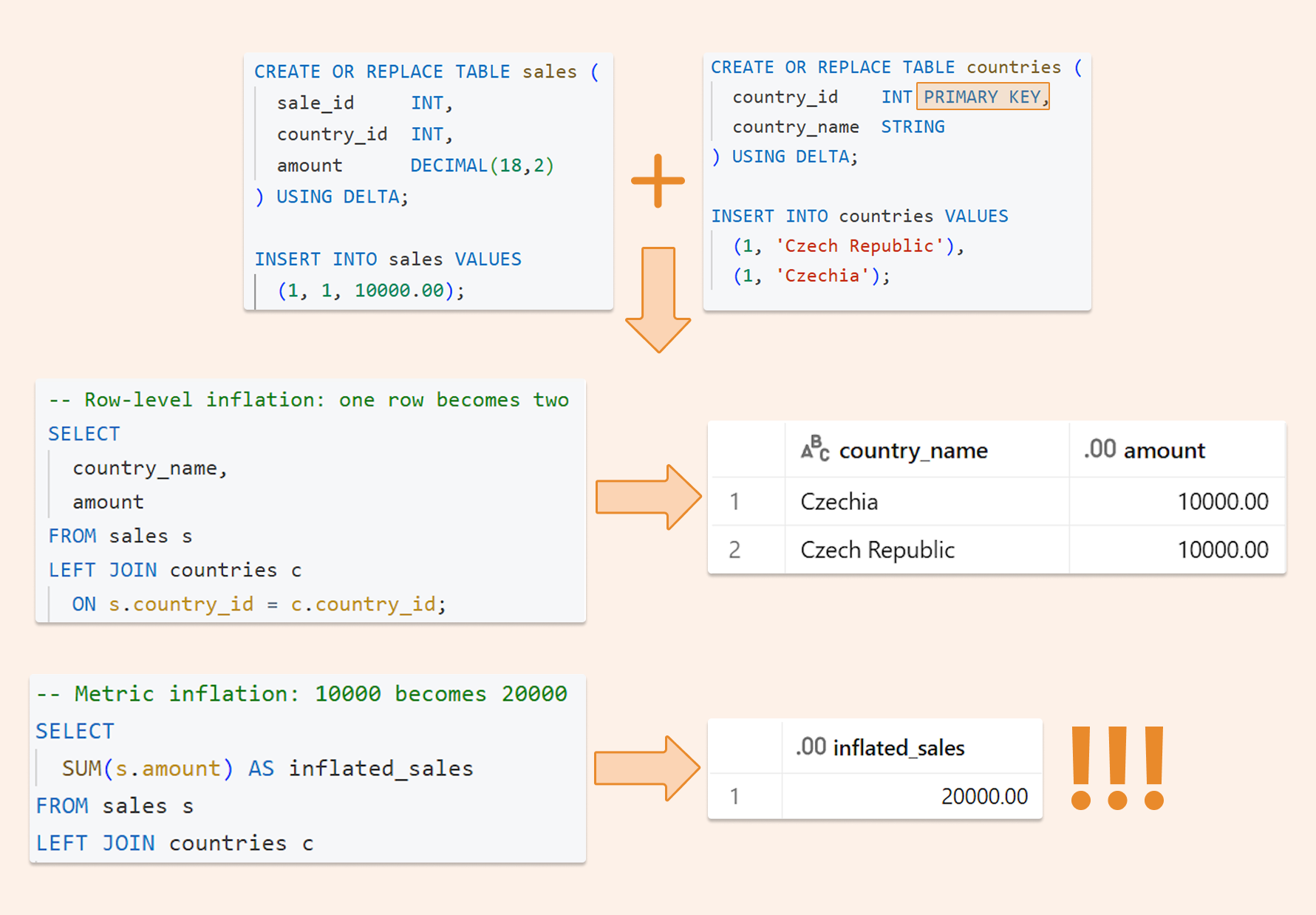
Deduplicating Data on the Databricks Lakehouse: Making joins, BI, and AI queries “safe by default.”

  Imagine this: your manager asks the AI analytics tool: "What were our top-selling products last quarter?" The AI generates perfe...