Tuesday, February 23, 2021

Awesome Free for developer

 https://free-for.dev/#/

https://github.com/ripienaar/free-for-dev

https://elvissaravia.substack.com/p/course-recommendations-for-introductoryhttps://github.com/subratcall/engineering-blogs


https://blog.feedspot.com/database_blogs/


https://orrsella.gitbooks.io/soft-eng-interview-prep/content/topics/data-structures-examples.html

https://github.com/dccuchile/CC6205

Blue book

d2l.ai

https://t.co/YGAaLZklfw?amp=1


https://ml4a.net/


repo: github.com/manujosephv/py paper: arxiv.org/abs/2104.13638


https://www.pyimagesearch.com/pyimagesearch-university/

Blue book

deeplearningbook.org

https://gvenzl.github.io/free-oracle-for-devs/#/

https://fullstackopen.com/en/


https://fullstackopen.com/en/


https://cds.nyu.edu/deep-learning/

Statistic: https://www.youtube.com/playlist?list=PL2SOU6wwxB0uwwH80KTQ6ht66KWxbzTIo
https://www.edx.org/course/introduction-to-probability

https://web.stanford.edu/~jurafsky/slp3/

Mooc for Siklern
https://inria.github.io/scikit-learn-mooc/
https://amueller.github.io/dabl/dev/index.html
https://python.hamel.dev/concurrency/

https://github.com/TheAlgorithms/Python

https://www.theinsaneapp.com/2021/06/list-of-python-projects-with-source-code-and-tutorials.html


https://cs182sp21.github.io/

Monday, February 22, 2021

DIY ANY_VALUE

 I really like the ANY_VALUE aggregate function. But since it was added in Oracle 19c, I can’t use it in my Oracle XE database, as currently the latest version of XE is 18c.

So I decided to implement it as a user-defined function using the Oracle Data Cartridges Interface.

Note that this implementation is for VARCHAR2. If the function is used on other data types, the regular rules for implicit conversion apply.

    
SQL> create type any_value_string_t as object
  2  (
  3      v_value varchar2(4000),
  4      static function odciaggregateinitialize(sctx in out any_value_string_t) return number,
  5      member function odciaggregateiterate
  6      (
  7          self  in out any_value_string_t,
  8          value in varchar2
  9      ) return number,
 10      member function odciaggregatemerge
 11      (
 12          self in out any_value_string_t,
 13          ctx2 in any_value_string_t
 14      ) return number,
 15      member function odciaggregateterminate
 16      (
 17          self        in any_value_string_t,
 18          returnvalue out varchar2,
 19          flags       in number
 20      ) return number
 21  );
 22  /

Type created.

SQL> create type body any_value_string_t as
  2
  3      static function odciaggregateinitialize(sctx in out any_value_string_t) return number is
  4      begin
  5          sctx := any_value_string_t(null);
  6          return odciconst.success;
  7      end;
  8
  9      member function odciaggregateiterate
 10      (
 11          self  in out any_value_string_t,
 12          value in varchar2
 13      ) return number is
 14      begin
 15          if self.v_value is null then
 16              self.v_value := value;
 17          end if;
 18          return odciconst.success;
 19      end;
 20
 21      member function odciaggregateterminate
 22      (
 23          self        in any_value_string_t,
 24          returnvalue out varchar2,
 25          flags       in number
 26      ) return number is
 27      begin
 28          returnvalue := self.v_value;
 29          return odciconst.success;
 30      end;
 31
 32      member function odciaggregatemerge
 33      (
 34          self in out any_value_string_t,
 35          ctx2 in any_value_string_t
 36      ) return number is
 37      begin
 38          if self.v_value is null then
 39              self.v_value := ctx2.v_value;
 40          end if;
 41          return odciconst.success;
 42      end;
 43
 44  end;
 45  /

Type body created.

SQL> begin
  2    $IF DBMS_DB_VERSION.ver_le_18 $THEN
  3      execute immediate q''create function any_value (p_value varchar2) return varchar2
  4                           parallel_enable
  5                           aggregate using any_value_string_t;'';
  6      execute immediate q''grant execute on any_value to public'';
  7      execute immediate q''create public synonym any_value for any_value'';
  8    $ELSE
  9      raise_application_error(-20000,'ANY_VALUE is now supported by Oracle');
 10    $END
 11  end;
 12  /

PL/SQL procedure successfully completed.

Now any_value can be used just like any built-in aggregate function:

SQL> conn hr/hr
Connected.
SQL> select banner from v$version;

BANNER
------------------------------------------------------------------------------------------------------------------------
Oracle Database 18c Express Edition Release 18.0.0.0.0 - Production

1 row selected.

SQL> select d.department_id,
  2         any_value(d.department_name) department_name,
  3         count(*) number_of_employees
  4  from   employees   e,
  5         departments d
  6  where  d.department_id = e.department_id
  7  group  by d.department_id;

DEPARTMENT_ID DEPARTMENT_NAME      NUMBER_OF_EMPLOYEES
------------- -------------------- -------------------
           10 Administration                         1
           20 Marketing                              2
           30 Purchasing                             6
           40 Human Resources                        1
           50 Shipping                              45
           60 IT                                     5
           70 Public Relations                       1
           80 Sales                                 34
           90 Executive                              3
          100 Finance                                6
          110 Accounting                             2

11 rows selected.

A new aggregate function – ANY_VALUE – was added to Oracle. It is documented as of Oracle 21c, but apparently it exists also in 19c (at least in 19.8 – the version in which I tested it).

Many times when writing an aggregate query we add expressions to the GROUP BY clause just because we want to add them to the select list, although they don’t change the aggregation result.

For example, let’s count the number of cities per country_id:

select c2.country_id,
       count(*) number_of_cities
from   cities    c1,
       countries c2
where  c2.country_id = c1.country_id
group  by c2.country_id;

NOW, WHAT IF WE WANT TO RETURN ALSO THE COUNTRY NAME?

country_id is the primary key of the countries table, so there is no reason to change the aggregation key. But in an aggregate query the select list can include only aggregate functions, GROUP BY expressions, constants, or expressions involving one of these.

OPTION 1

So a common practice is to add country_name to the GROUP BY clause:

select c2.country_id,
       c2.country_name,
       count(*) number_of_cities
from   cities    c1,
       countries c2
where  c2.country_id = c1.country_id
group  by c2.country_id,
          c2.country_name;

Adding country_name to the GROUP BY clause is artificial, makes the query less clean, and the SQL engine may need to work harder as the aggregation key is wider.

OPTION 2

An alternative approach is to choose some simple aggregate function that won’t change the desired result, like MIN or MAX (but not SUM or COUNT…), and apply it on country_name in the select list:

select c2.country_id,
       min(c2.country_name) country_name,
       count(*) number_of_cities
from   cities    c1,
       countries c2
where  c2.country_id = c1.country_id
group  by c2.country_id;

Since all the records in the same group belong to the same country_id, then country_name is the same for all of them, so MIN(country_name)=MAX(country_name)=the right value.
In this option we don’t litter the GROUP BY clause, but we add an arbitrary aggregate function to the select list, which still feels artificial, and adds some (small) extra work for the SQL engine.

OPTION 3 – ANY_VALUE

Now we can use ANY_VALUE instead. ANY_VALUE(country_name) returns, for each group, the value of country_name from one of the records in that group.

select c2.country_id,
       any_value(c2.country_name) country_name,
       count(*) number_of_cities
from   cities    c1,
       countries c2
where  c2.country_id = c1.country_id
group  by c2.country_id;

Since ANY_VALUE is considered an aggregate function, we don’t need to add it to the GROUP BY clause. But, by definition, it’s a very simple function, so the performance overhead should be negligible with respect to other aggregate functions.

Using ANY_VALUE also makes the query more readable, in my opinion. It makes our intention clear (unlike the use of the MIN function in the previous example).

OPTION 4

There is another alternative to solve our example:

select c2.country_id,
       c2.country_name,
       c1.number_of_cities
from   (select country_id,
               count(*) number_of_cities
        from   cities
        group  by country_id) c1,
       countries c2
where  c2.country_id = c1.country_id;

Here we “aggregate and then join”, rather than “join and then aggregate”.

USE ANY_VALUE WISELY

I think that ANY_VALUE is a great addition to Oracle SQL. But use it wisely. Remember that by definition it is not deterministic. If you know that some_expression is unique for all the records in the same group in your query, then any_value(some_expression) is deterministic in your query and can be used safely. Otherwise, think very carefully if it’s appropriate for your case.


Wednesday, February 17, 2021

Top 10 Python Libraries for Data Science in 2021

 Learning data science can be overwhelming. There are hundreds of tools and resources out there and it’s not always obvious what tools you should be focusing on or what you should learn.

The short answer is that you should learn what you enjoy because data science offers a wide range of skills and tools. That being said, I wanted to share with you what I believe are the top 10 Python libraries that are most commonly used in data science.

With that said, here are the Top 10 Python Libraries for Data Science:

1. Pandas

Image for post
Image provided by The pandas development team

You’ve heard the saying. 70 to 80 percent of a data scientist’s job is understanding and cleaning the data, aka data exploration and data munging.

Pandas is primarily used for data analysis, and it is the one of the most commonly used Python libraries. It provides you with some of the most useful set of tools to explore, clean, and analyze your data. With Pandas, you can load, prepare, manipulate, and analyze all kinds of structured data. Machine learning libraries also revolve around Pandas DataFrames as an input.

Where to Learn Pandas

2. NumPy

Image for post
Image provided by Wikimedia

NumPy is mainly used for its support for N-dimensional arrays. Its multidimensional arrays are 50 times more robust compared to Python lists, making NumPy a favorite for data scientists.

NumPy is also used by other libraries such as TensorFlow for their internal computation on tensors. NumPy also provides fast precompiled functions for numerical routines, which can be hard to manually solve. To achieve better efficiency, NumPy uses array-oriented computations, so working with multiple classes becomes easy.

Where to Learn NumPy

3. Scikit-learn

Image for post
Image provided by Wikimedia

Scikit-learn is arguably the most important library in Python for machine learning. After cleaning and manipulating your data with Pandas and/or NumPy, scikit-learn is used to build machine learning models as it has tons of tools used for predictive modelling and analysis.

There are many reasons to use scikit-learn. To name a few, you can use scikit-learn to build several types of machine learning models, supervised and unsupervised, cross-validate the accuracy of models, and conduct feature importance.

Where to Learn Scikit-learn

4. Gradio

Image for post
Image taken by Gradio (with permission)

Gradio lets you build and deploy web apps for your machine learning models in as little as three lines of code. It serves the same purpose as Streamlit or Flask, but I found it much faster and easier to get a model deployed.

Gradio is useful for the following reasons:

  1. It allows for further model validation. Specifically, it allows you to interactively test different inputs into the model.
  2. It’s a good way to conduct demos.
  3. It’s easy to implement and distribute because the web app is accessible by anyone through a public link.

Where to Learn Gradio

5. TensorFlow

Image for post
Image provided by Wikimedia

TensorFlow is one of the most popular libraries of Python for implementing neural networks. It uses multidimensional arrays, also known as tensors, which allows it to perform several operations on a particular input.

Since it is highly parallel in nature, it can train multiple neural networks and GPUs for highly efficient and scalable models. This feature of TensorFlow is also called pipelining.

Where to Learn TensorFlow

6. Keras

Image for post
Image provided by Wikimedia

Keras is mainly used for creating deep learning models, specifically neural networks. It’s built on top of TensorFlow and Theano and allows you to build neural networks very simply. Since Keras generates a computational graph using back-end infrastructure, it is relatively slow compared to other libraries.

Where to Learn Keras

7. SciPy

As the name suggests, SciPy is mainly used for its scientific functions and mathematical functions derived from NumPy. Some useful functions which this library provides are stats functions, optimization functions, and signal processing functions. To solve differential equations and provide optimization it includes functions for computing integrals numerically. Some of the applications which make SciPy important are:

  • Multi-dimensional image processing
  • Ability to solve Fourier transforms, and differential equations
  • Due to its optimized algorithms, it can do linear algebra computations very robustly, and efficiently

Where to Learn Statsmodels

8. Statsmodels

Statsmodels is a great library for doing hardcore statistics. This multifunctional library is a blend of different Python libraries, taking its graphical features, and functions from Matplotlib, for data handling it uses Pandas, for handling R-like formulas it uses Pasty and is built on NumPy and SciPy.

Specifically, it’s useful for creating statistical models, like OLS, and also for performing statistical tests.

Where to Learn Statsmodels

9. Plotly

Image for post
Image provided by Wikimedia

Plotly is definitely a must-know tool for building visualizations since it is extremely powerful, easy to use, and has a big benefit of being able to interact with the visualizations.

Along with Plotly is Dash, which is a tool that allows you to build dynamic dashboards using Plotly visualizations. Dash which is a web-based python interface that removes the need for JavaScript in these types of analytical web applications and allows you to run these plots online and offline.

Where to Learn Plotly

10. Seaborn

Built on the top of Matplotlib, Seaborn is an effective library for creating different visualizations.

One of the most important features of Seaborn is the creation of amplified data visuals. Some of the correlations that are not obvious initially can be displayed in a visual context, allowing Data Scientists to understand the models more properly.

Due to its customizable themes and high-level interfaces, it provides well-designed and extraordinary data visualizations, hence making the plots very attractive which can, later on, be shown to the stakeholders also.

Where to Learn Seaborn

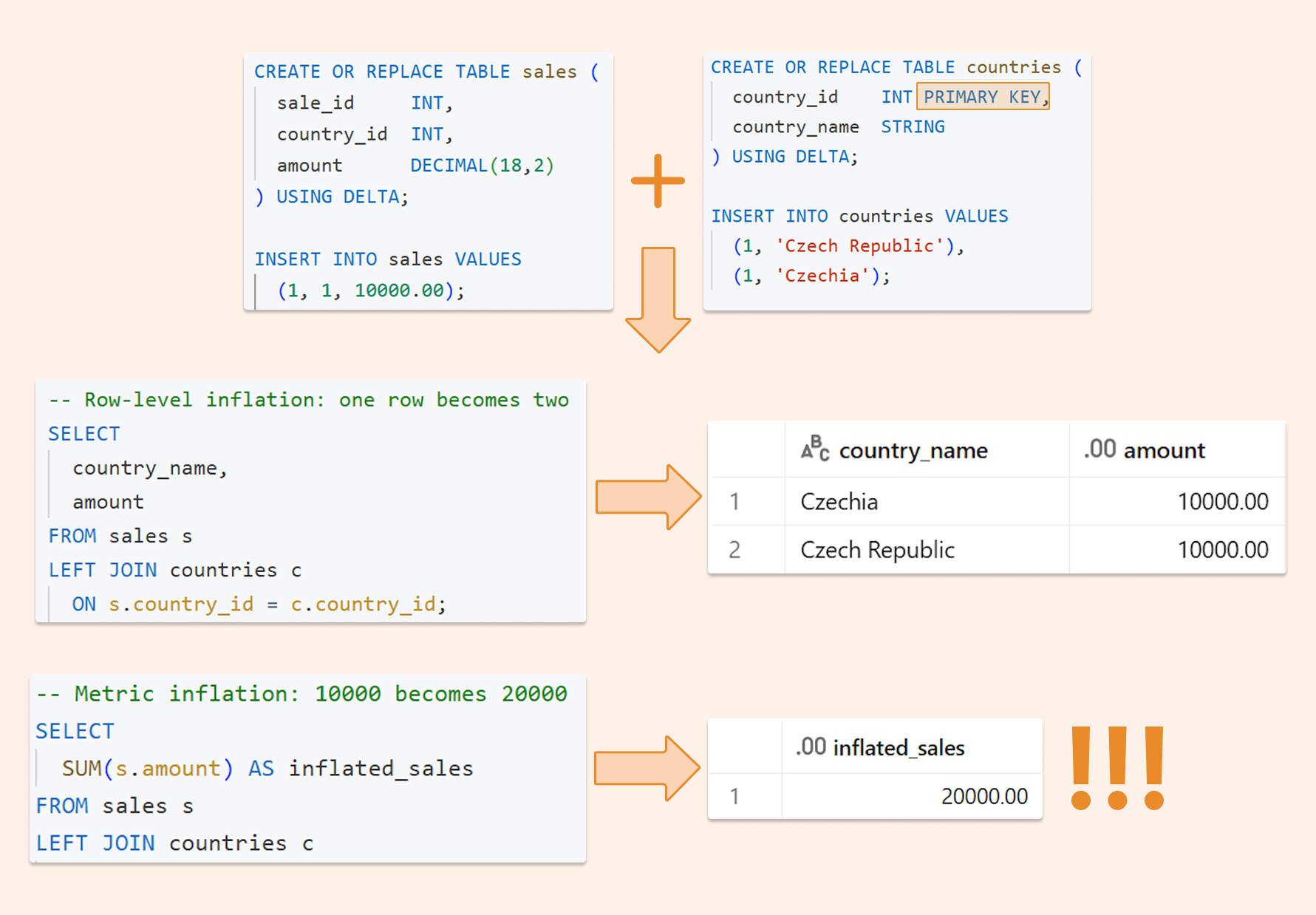
Deduplicating Data on the Databricks Lakehouse: Making joins, BI, and AI queries “safe by default.”

  Imagine this: your manager asks the AI analytics tool: "What were our top-selling products last quarter?" The AI generates perfe...