Imagine this: your manager asks the AI analytics tool: "What were our top-selling products last quarter?" The AI generates perfect SQL. It runs without errors. The dashboard looks great. The numbers are completely wrong. The cause? Duplicate records in a dimension table. When the query joins sales to products, each duplicate multiplies the counts. Your #1 product isn't actually #1. Decisions get made on fictional data.
This isn't hypothetical, it's happening in Lakehouse environments right now.
Unlike traditional databases, Delta Lake doesn't enforce primary keys. This design enables massive scale and flexibility, but it means duplicates can silently exist in normal-looking tables. As analytics shifts from careful analysts to AI-generated queries and self-service BI tools, these duplicates transform from occasional annoyances into systemic data quality failures.
AI danger (or why this problem is about to get worse)
The traditional safety net for data quality was human expertise. Experienced analysts understood their data intimately—they knew which tables to trust, which joins were risky, how to validate unexpected results, and when to dig deeper.
That safety net is rapidly disappearing:
AI assistants generate SQL from natural language A user types: "Show me revenue by country." The AI produces syntactically perfect SQL with proper joins and aggregations. It runs without errors. The results look reasonable. But if the country dimension has duplicates, every number is systematically inflated.
BI tools auto-generate queries from drag-and-drop A business user drops "Country" and "Sales Amount" into Tableau or Power BI. The tool constructs the join automatically. The visualization renders beautifully. The executive dashboard goes to the board. Nobody realizes the underlying data multiplied incorrectly.
Self-service users expect data to "just work" Unlike analysts who validate their queries, self-service users assume the data platform guarantees correctness. They don't know to check for duplicates. They don't know how joins can multiply facts. They just trust the number on the screen.
The shift from analyst-authored to machine-generated queries fundamentally changes the failure mode:
Before: An analyst might notice something seems off and investigate
Now: Automated queries fail silently—syntactically correct but semantically wrong
Impact: Systematic errors propagate through every AI-generated query, dashboard, and decision
Deduplication isn't a data engineering nicety anymore. It's the foundation that makes AI-powered analytics trustworthy.
The Fundamental Problem: Lakehouses Don't Enforce Primary Keys
Unlike traditional databases, Delta Lake tables do not enforce primary keys. This design choice enables massive scalability and flexibility, but it means duplicates can exist even when data "looks" correct.
A Simple Example That Breaks Everything
Imagine you have:
A fact table:
saleswith columns(sale_id, country_id, amount)A dimension table:
countrywith columns(country_id, country_name)
Now assume the country dimension contains duplicate entries for the same country_id—perhaps due to a data load retry, or historical name changes that weren't properly handled.
When you join sales to country, a single sales row can match multiple dimension rows:
-- Looks innocent enough
SELECT
    c.country_name,
    SUM(s.amount) as total_sales
FROM sales s
JOIN country c ON s.country_id = c.country_id
GROUP BY c.country_name
Result: Your SUM becomes wrong. If there are 2 duplicate country records, every sale gets counted twice. $10,000 becomes $20,000.
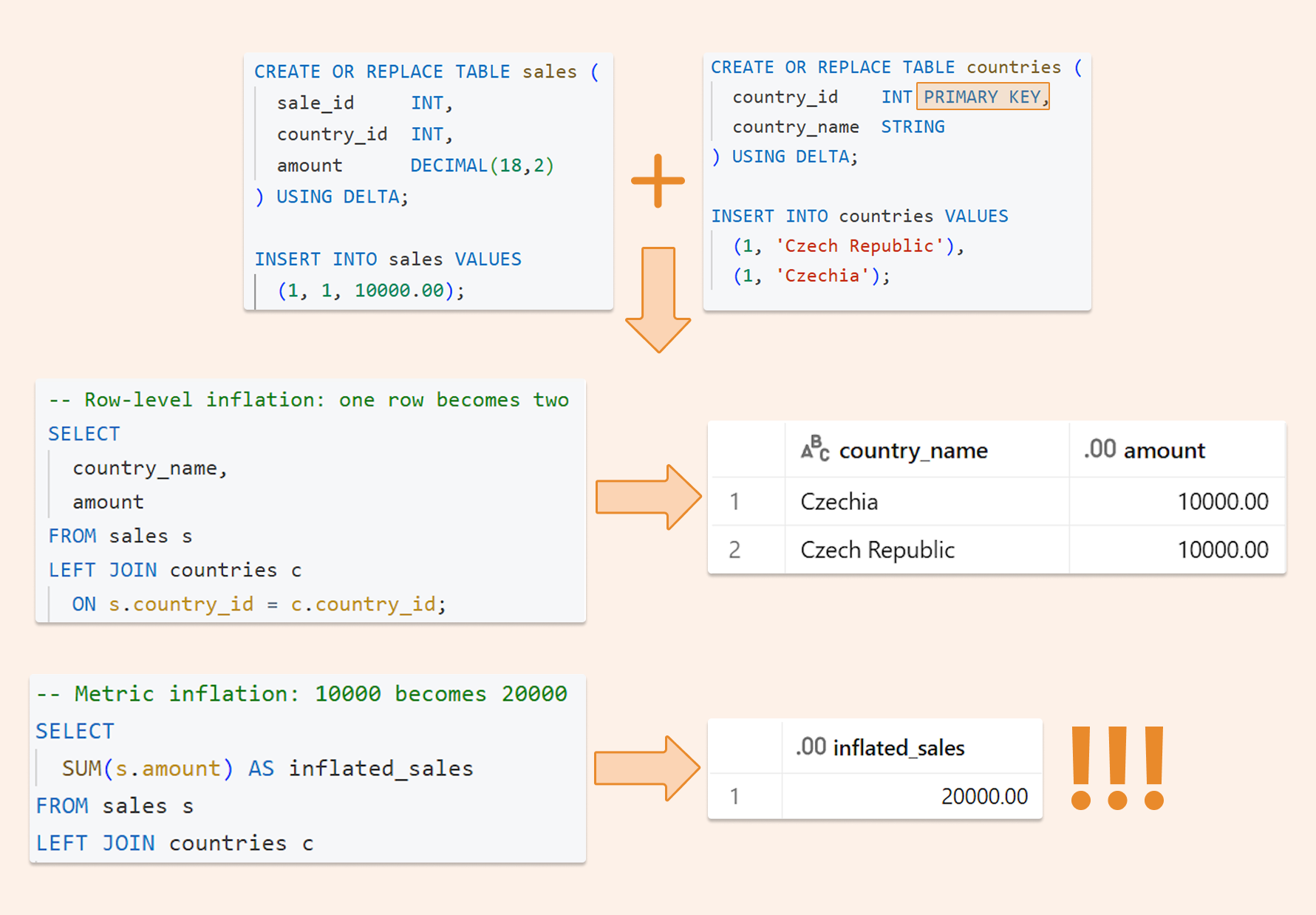
Note that this issue can’t be resolved by changing the join type. A join cannot eliminate duplication; it can only reveal it. Even if you pre-aggregate sales, duplicated dimension rows will still multiply the aggregated outcomes.
Choosing Your Deduplication Strategy: A Decision Framework
The best deduplication approach depends on your data pipeline architecture.
The layered defense approach (recommended): Most production systems combine two layers:
Prevent duplicates early (Strategy A, B, or C during ingestion)
Detect and stop duplicates (Strategy D for data quality enforcement)
Strategy A: Deterministic dedup rule: “latest wins.”
When to use
You ingest updates in micro-batches (files, Auto Loader, Kafka micro-batch, etc.)
Duplicates often appear in the incoming batch (due to retries, late arrivals, or replays).
Idea
Deduplicate the incoming batch before writing/merging.
MERGE into the target using a deterministic rule: “latest record wins.”
To make “latest wins” truly deterministic, you need:
a stable business key (what identifies the entity, e.g., country_id or customer_id)
an ordering column (e.g. updated_at, ingest_time, version, sequence_id)
a tie-breaker if timestamps can be equal (e.g., file name + row number, or a monotonically increasing sequence)
Pros
Easy to understand
Deterministic results (same input → same output)
Works for most batch/micro-batch pipelines
Cons
Can become expensive at scale if your MERGE requires a large scan of the target
The "Latest wins" logic can become challenging to maintain as rules grow more complex, for example, when integrating multi-column priority or source ranking.
MERGE INTO dim_country AS t
USING (
  SELECT country_id, country_name, updated_at
  FROM (
    SELECT
      *,
      ROW_NUMBER() OVER (PARTITION BY country_id ORDER BY updated_at DESC) AS rn
    FROM stg_country_changes
  ) x
  WHERE rn = 1
) AS s
ON t.country_id = s.country_id
WHEN MATCHED THEN UPDATE SET
  t.country_name = s.country_name,
  t.updated_at   = s.updated_at
WHEN NOT MATCHED THEN INSERT (country_id, country_name, updated_at)
VALUES (s.country_id, s.country_name, s.updated_at);
Strategy B: Delta Change Data Feed (CDF) + “AUTO CDC" pipelines
When to use
You have a source that produces changes (inserts/updates/deletes)
You want a more declarative CDC approach (instead of hand-written MERGE logic everywhere)
Idea
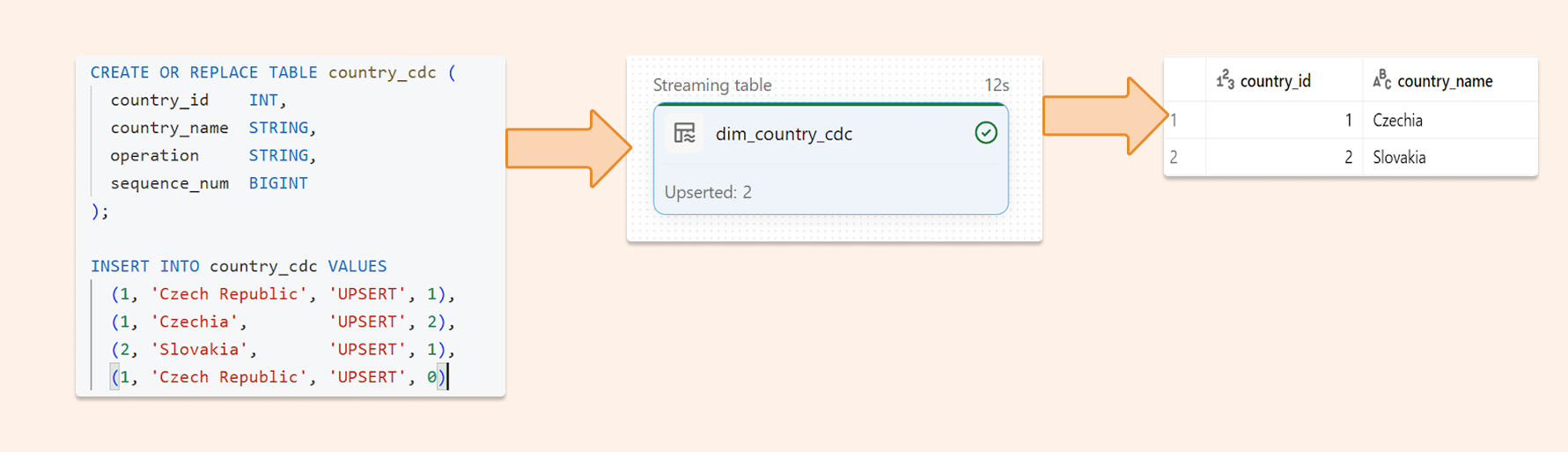
Delta Change Data Feed, in combination with Lakeflow Spark Declarative Pipelines "Auto CDC", applies changes to your target table. That syntax is optimized for storing Slowly Changed Dimensions and is ideal for deduplication; the simplest option is SCD type 1 (without history). Functionality is optimized for all possible scenarios (including late-arriving data, etc.)
Key details:
create_auto_cdc_flow() replaced apply_changes()
stored_as_scd_type expects 1 or 2 (SCD Type 1 / Type 2)
Deletes can be handled with apply_as_deletes
Why does this help dedup
CDC-based pipelines address merge complexity by handling changes consistently and predictably? By clearly defining change events, including ordering, many duplicate patterns caused by reprocessing can be avoided.
In my opinion, it is the best available approach for dimensions. For transactions (big data), performance can be reduced as it still needs to scan for keys.
CREATE OR REFRESH STREAMING TABLE dim_country_cdc;

CREATE FLOW dim_country_flow
AS AUTO CDC INTO dim_country_cdc
FROM stream(country_cdc)
KEYS (country_id)
APPLY AS DELETE WHEN operation = "DELETE"
SEQUENCE BY sequence_num
COLUMNS * EXCEPT (operation, sequence_num)
STORED AS SCD TYPE 1;
Strategy C: Streaming dedup with Spark Structured Streaming transformWithStateInPandas (bounded duplicates window)
When to use
You ingest a stream of events.
Duplicates can arrive late, but only within a bounded window (example: max 24 hours late)
You want low-latency processing without doing heavy batch-style dedup joins.
Idea
Use stateful streaming deduplication:
key by event_id (or another unique event key)
keep state for a limited time (TTL), such as 24 hours
output only the first occurrence of each key within the TTL window
Duplicates arriving within the TTL window are dropped.
After TTL, the state is evicted (so memory stays bounded)
What you get
One output record per event_id per TTL window
This matches the rule: “If you're sure duplicates won't arrive later than the state window, it's perfect.”
Pros
Very efficient for streaming use cases
State is kept in a small and fast file-based database - RocksDV
Good “exactly-once-ish” behavior when combined with proper checkpointing
Cons
Only safe if you really have a bounded lateness/duplication window
State size must be managed (TTL, watermarks, partitioning strategy)
Not ideal if duplicates can arrive months later
In my opinion, it is the best solution for processing large transactional data volumes. Below code I successfully implemented.
spark.conf.set("spark.sql.streaming.stateStore.providerClass", "org.apache.spark.sql.execution.streaming.state.RocksDBStateStoreProvider")

from pyspark.sql.types import StructType, StructField, LongType, StringType
from pyspark.sql.streaming import StatefulProcessor, StatefulProcessorHandle
import pandas as pd
from typing import Iterator

# Output schema for the deduplicated records
output_schema = StructType(
    [StructField("id", LongType(), True), StructField("data", StringType(), True)]
)

class DeduplicateProcessor(StatefulProcessor):
    def init(self, handle: StatefulProcessorHandle) -> None:

        self.seen_flag = handle.getValueState(
            "seen_flag", output_schema
        )
        # schema can be diffrent we don't need to keep everything in store
        # third param is TTL in seconds

    def handleInputRows(
        self, key, rows: Iterator[pd.DataFrame], timer_values
    ) -> Iterator[pd.DataFrame]:

        # we loop all rows for given key in current micro-batch as it is grouping, we can implement some logic here
        for pdf in rows:
            for _, pd_row in pdf.iterrows():
                data = pd_row

        # we are checking is data exisitng for given Key (one from groupBY) in RocksDB
        if not self.seen_flag.exists():

            self.seen_flag.update((data[0],data[1])) # data which will be stored together with our key in RocksDB
            yield pd.DataFrame(
                {"id": key, "data": (data[1],)}
            ) # data which we return to browser

    def close(self):
        # Some DBR versions require close() with no argument
        pass


display(
    spark.readStream.table("default.events")
    .groupBy("id")
    .transformWithStateInPandas(
        statefulProcessor=DeduplicateProcessor(),
        outputStructType=output_schema,
        outputMode="Append",
        timeMode="None",
    )
)
Strategy D: DLT / Lakeflow expectations: count PK occurrences + fail or quarantine (the “count trick”)
When to use
You want a data quality contract: “This key must be unique.”
You want to stop the pipeline or isolate bad records.
Idea
Databricks documents a primary key uniqueness validation pattern:
groupBy(pk).count()
expectation: count == 1
Two standard operating modes:
Fail fast when duplicates appear (strongest contract)
Use this when downstream correctness matters more than availability. If duplicates appear, the pipeline fails and is connected to monitoring, which requires you to review the cause of the duplicates.
CREATE OR REFRESH MATERIALIZED VIEW country_pk_counts AS
SELECT
  country_id,
  COUNT(*) AS cnt
FROM
  countries
GROUP BY
  country_id;

-- Expectation: fail if any cnt != 1
CREATE OR REFRESH MATERIALIZED VIEW country_pk_assert (
    CONSTRAINT pk_is_unique EXPECT(cnt = 1) ON VIOLATION FAIL UPDATE
  ) AS
SELECT
  *
FROM
  country_pk_counts;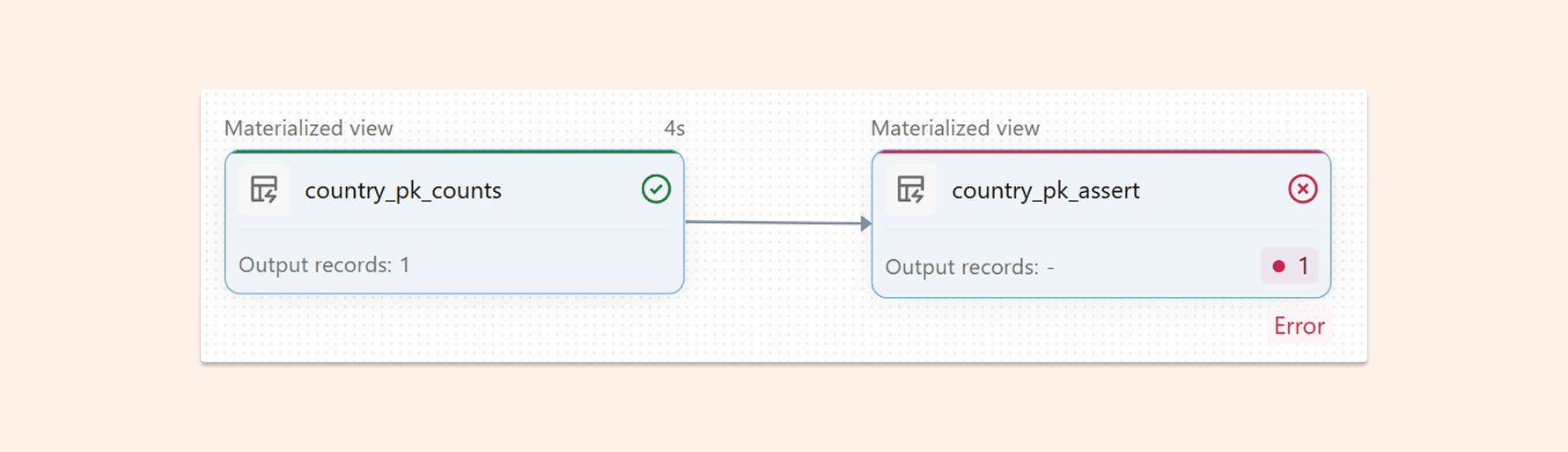
Quarantine duplicates (keep pipeline running)
Use this when you cannot block the pipeline. You keep processing good records and route duplicates to a quarantine table for review and replay.
-- 1) Add per-row duplicate count (cnt) using a window
-- Use PRIVATE so it’s an intermediate dataset (not published to the catalog)
CREATE OR REFRESH PRIVATE MATERIALIZED VIEW country_with_cnt AS
SELECT
  c.*,
  RANK(*) OVER (PARTITION BY country_id ORDER BY timestamp) AS cnt
FROM
  countries c;

-- 2) Clean dataset with a data-quality rule:
-- Drop anything where cnt != 1 (so all rows for duplicated keys are rejected)
CREATE OR REFRESH MATERIALIZED VIEW country_silver (
    CONSTRAINT unique_country_id EXPECT(cnt = 1) ON VIOLATION DROP ROW
  ) AS
SELECT
  country_id,
  country_name,
  cnt
FROM
  country_with_cnt;

-- 3) Quarantine dataset = the reverse condition (cnt > 1)
CREATE OR REFRESH MATERIALIZED VIEW country_duplicated (
    CONSTRAINT duplicated_country_id EXPECT(cnt > 1) ON VIOLATION DROP ROW
  ) AS
SELECT
  country_id,
  country_name,
  cnt
FROM
  country_with_cnt;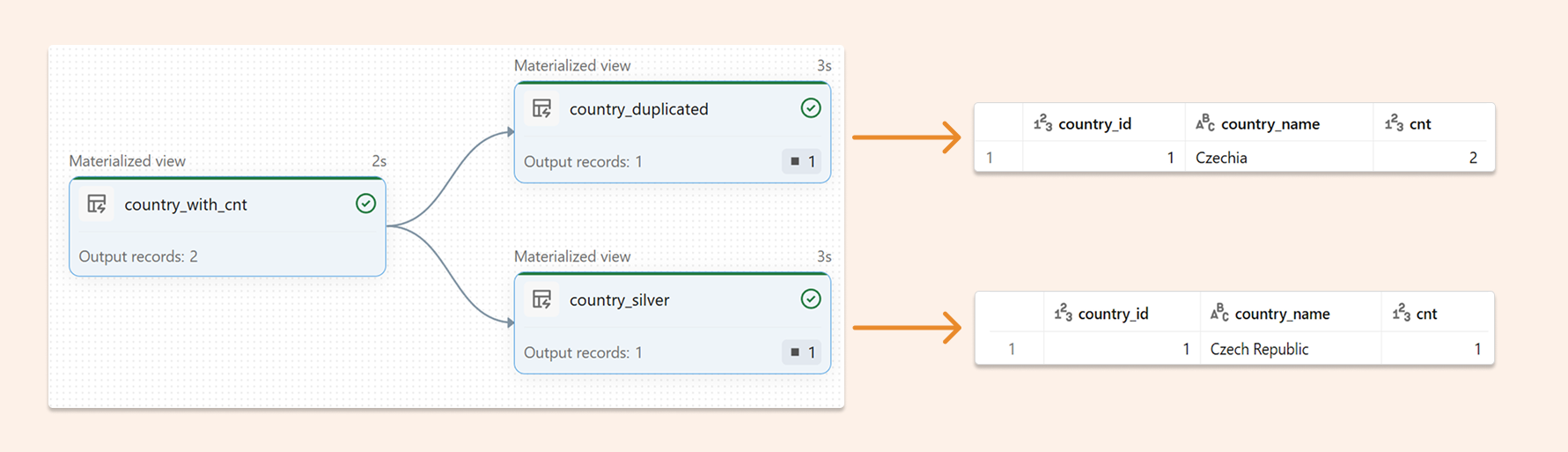
Pros
Strategy D is about proving uniqueness and making data quality visible and enforceable. No other solution offers this level of observability.
Cons
Efficiency can be very low due to constant counting, even for medium-sized datasets.
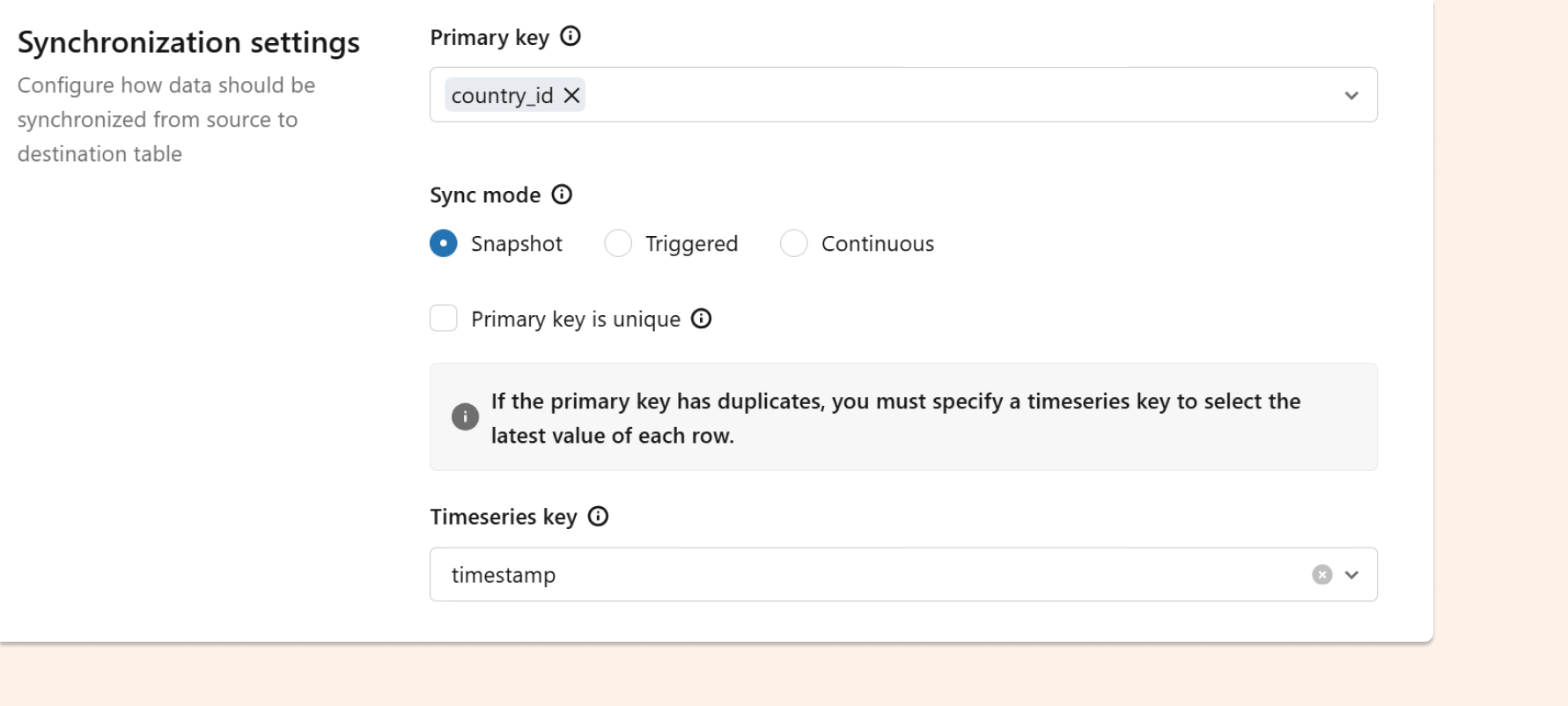
Strategy E: Lakebase synced tables — dedup at sync time using a Timeseries Key
When to use
You serve data through Lakebase (managed Postgres inside Databricks)
Synced tables require a Primary Key.
Your source table can contain duplicate PKs, but you want a clean serving layer.
Idea
During sync configuration:
Choose the Primary Key
If duplicates exist, choose a Timeseries Key so that only the latest row per PK is retained.
Pros
Easy out-of-the-box friendly configuration.
You can expose a deduped table to apps/users even if the raw lakehouse data is messy.
Cons
This fixes the serving output, but it does not automatically fix analytics correctness upstream.
You should still deduplicate earlier for reporting and trustworthy aggregations.
You still have in Lakehouse duplicated and need to sync back the deduplicated table (sync cost) or read through Lakehouse federation (double compute penalty)
After Deduplication: Information Constraints for Query Optimization
Once you've implemented and validated deduplication using the strategies above, you can add informational constraints to help the Databricks query optimizer.
What Are Information Constraints?
Unity Catalog supports PRIMARY KEY and FOREIGN KEY constraints that are:
NOT ENFORCED: Databricks does not prevent you from inserting duplicates
Informational only: They tell the optimizer "I promise this is unique"
Used for query rewrites: Photon can optimize based on these guarantees
Example: Adding a Primary Key Constraint
--- Adding a Primary Key Constraint
ALTER TABLE dedup_demo.country_silver
ADD CONSTRAINT country_pk PRIMARY KEY (country_id) NOT ENFORCED RELY;
What Optimizations Does This Enable?
The RELY keyword means: "Optimizer, you can trust this constraint for query rewrites."
Foreign Key Join Optimizations
Critical Warning: Because constraints are NOT ENFORCED, you are responsible for ensuring they are actually true. If you mark an invalid constraint as RELY, the optimizer will make incorrect assumptions, potentially leading to:
Wrong query results (e.g., missing rows)
Silent data corruption
Incorrect aggregations
Conclusion: Building Trust in the Age of AI Analytics
The shift to AI-powered analytics fundamentally changes what "good enough" means for data quality.
When analysts wrote every query, they could spot anomalies and validate results. They were the last line of defense against data quality issues. But as AI assistants generate queries and self-service tools proliferate, that safety net disappears. A single duplicate in a dimension table doesn't just affect one analysis—it systematically corrupts every AI-generated query that touches that table.
The stakes are different now.
Choose the right deduplication strategy for your architecture. Implement it early in your pipelines. Add quality checks to prove uniqueness. Monitor continuously. Only then can you confidently enable AI assistants and self-service tools, knowing they won't multiply your data into fictional insights.
The Lakehouse architecture gives you incredible flexibility and scale. But that flexibility means you're responsible for enforcing the constraints that traditional databases handled automatically. Duplicates aren't an edge case to fix later—they're a systematic risk that needs systematic prevention.
Build your deduplication strategy now, before AI-generated queries expose the gaps.
https://www.sunnydata.ai/blog/


